


 Login
Login

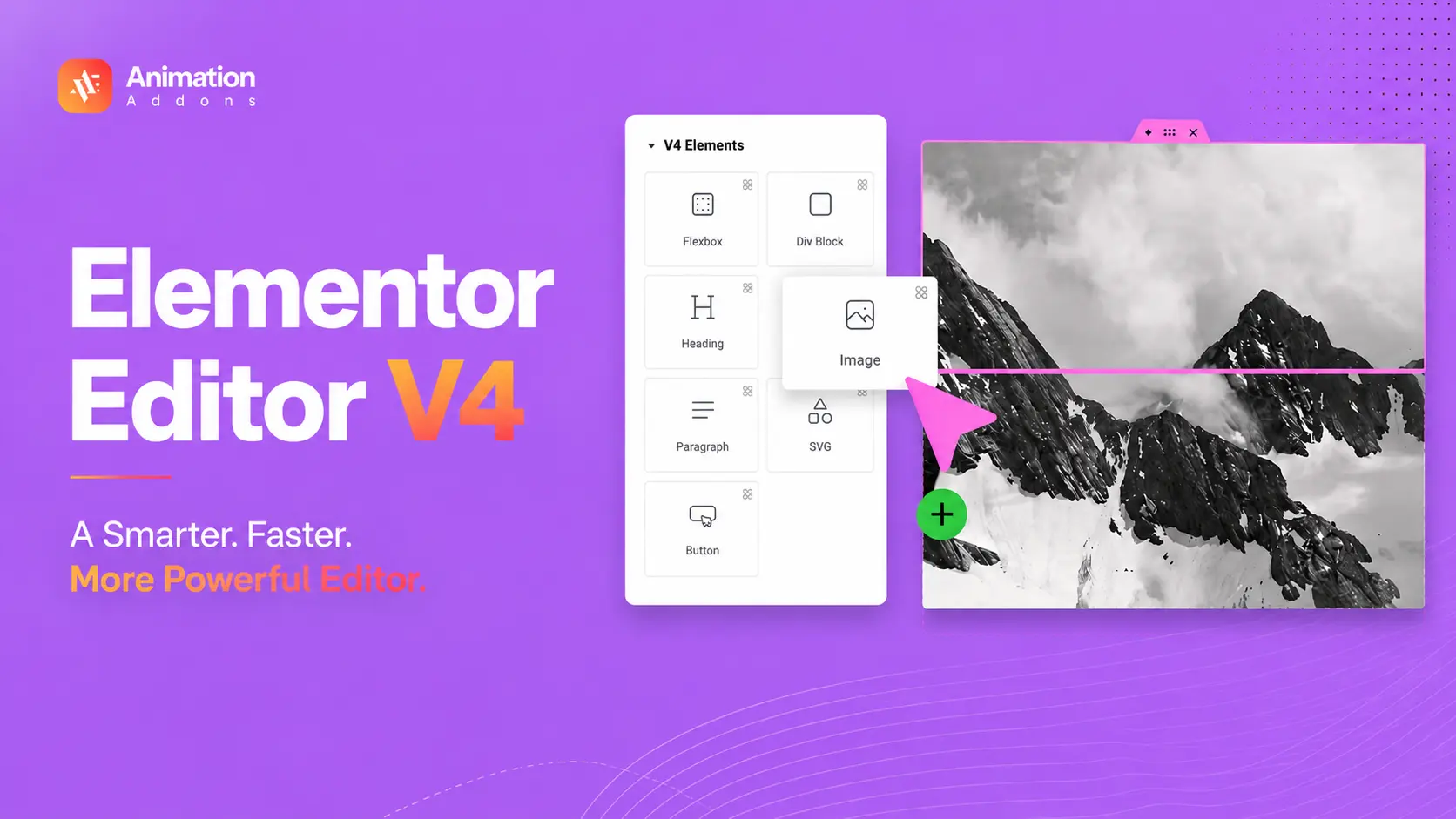
The WordPress ecosystem is entering a new era of website design and development, and Elementor v4 is leading that transformation.
Over the last few years, web design has evolved rapidly. Modern websites are no longer static pages filled with basic content blocks.
Today’s websites demand better performance, cleaner structures, reusable design systems, advanced animations, and highly interactive user experiences.
With the introduction of Atomic Elements, Variables, Classes, Components, Atomic Forms, and advanced Interactions, Elementor is moving closer to modern front-end development principles while still maintaining its visual drag-and-drop experience.
Elementor V4, also called the Atomic Editor, is Elementor’s new website-building architecture built around Atomic Elements, Classes, Variables, Components, responsive controls, and Interactions.
Unlike the traditional widget-based workflow, V4 focuses on reusable design systems, cleaner structures, and more consistent styling. Elementor 4.0 is now live, with Atomic features enabled by default on new installations.
What Is Elementor 4.0?
Elementor 4.0 is the next-generation version of the Elementor page builder that focuses heavily on performance, scalability, cleaner code output, and design system workflows. Unlike previous versions that relied on nested sections, columns, and individual widget styling, Elementor 4.0 introduces a more modular and reusable editing system.
Traditionally, Elementor websites often became structurally complex because every widget carried its own styling and multiple wrapper elements. Elementor 4.0 attempts to solve these problems by separating structure, styling, content, and interactions into reusable systems.
This new architecture follows the principles of atomic design, a methodology commonly used in professional UI and front-end development environments. Instead of building every section from scratch, users can now create reusable building blocks that work consistently throughout an entire website.
What’s New in Elementor 4.0 Atomic Editor?
Elementor 4.0 introduces a major shift in how WordPress websites are designed and managed. The Atomic Editor is designed to create cleaner workflows, reusable systems, and a more future-ready website-building experience.
The Core Foundations of Elementor V4
The new Atomic Editor is built around several important improvements that redefine the Elementor workflow:
- Atomic-based layout system for cleaner and more modular page structures
- Centralized design management using reusable Classes, Variables, and Components
- Reusable building blocks that simplify large-scale website creation
- Performance-focused architecture with cleaner DOM output and faster rendering
| Elementor V4 feature | What it does | Why it matters |
|---|---|---|
| Atomic Elements | Smaller reusable building blocks | Cleaner layouts |
| Classes | Reusable styling | Faster site-wide changes |
| Variables | Central design values | Consistent branding |
| Components | Reusable layout systems | Easier scaling |
| States | Hover/focus/active styling | Better interactions |
| Responsive editing | Device-specific controls | Better responsive design |
| Interactions | Trigger-based motion | More dynamic UX |
| Atomic Forms | Flexible field-level design | Better form layouts |
| Grid | Advanced grid layouts | More layout flexibility |
| Loops | Dynamic repeating layouts | Better dynamic content |
Elementor V3 vs V4: What’s Actually Different?
| Feature | Elementor V3 | Elementor V4 |
|---|---|---|
| Core workflow | Widget-based | Atomic Elements |
| Styling | Widget-specific controls | Unified Style system |
| Classes | Limited/global approach | Native Classes |
| Variables | Global settings | Design Variables |
| Components | Global widgets/templates | Reusable Components |
| Responsive editing | Control-specific | Device-specific styling |
| DOM structure | More wrappers | Leaner Atomic structure |
| Interactions | Existing motion tools | Native interaction system |
| Design systems | Less centralized | Classes + Variables + Components |
| New-site default | V3 workflow | V4 Atomic features |
Flexbox and Cleaner Structure for Better Performance
Elementor V4 editor fully embraces a lightweight Flexbox-based structure, replacing many of the older nested layout systems used previously. This creates cleaner HTML output, reduces unnecessary wrapper elements, and improves rendering efficiency across the website.
Benefits of the new structure include:
- Faster-loading web pages
- Cleaner and more maintainable code
- Improved responsiveness across devices
- Better SEO and Core Web Vitals performance
- Smoother animations and interactions
How to Start Using the Atomic Editor
Getting started with Elementor editor V4 is simple and does not require rebuilding your existing website.
Basic Setup Process
- Update Elementor to the latest available version
- Open Elementor settings from the WordPress dashboard
- Enable the Atomic Editor option
- Activate the new editing experience
The best part is that your current pages remain untouched. Existing V3 layouts, widgets, and designs continue working normally while giving you the freedom to gradually explore the new Atomic workflow at your own pace.
Atomic Elements and Cleaner Website Structures
One of the most important features of Elementor 4.0 is the introduction of Atomic Elements. These are lightweight modular elements designed to replace the heavier widget structures used in earlier versions of Elementor.
Atomic Elements include things like headings, paragraphs, buttons, tabs, forms, and layout containers. Unlike traditional widgets, these elements are built with cleaner HTML structures and significantly fewer unnecessary wrappers.
This improvement is extremely important because excessive nested wrappers have long been one of the biggest performance concerns in page builders. Too many wrappers create larger DOM structures, which can negatively affect loading speed, rendering performance, responsiveness, and animation smoothness.
By reducing unnecessary HTML complexity, Elementor 4.0 creates websites that are lighter and more efficient. Cleaner DOM structures also improve browser rendering performance that use advanced motion effects, scroll animations, and interactive experiences.
A Smarter Design System with Variables
A powerful addition in Elementor v4 components is the introduction of Variables. Variables allow users to define reusable design values that can be used throughout an entire website.
Instead of manually entering the same colors, spacing values, typography sizes, or dimensions repeatedly, users can now create centralized variables that control those values globally.
For example, if a website uses a primary brand color across buttons, headings, backgrounds, and icons, that color can be stored as a variable. If the branding changes later, updating the variable instantly updates every connected element across the entire website.
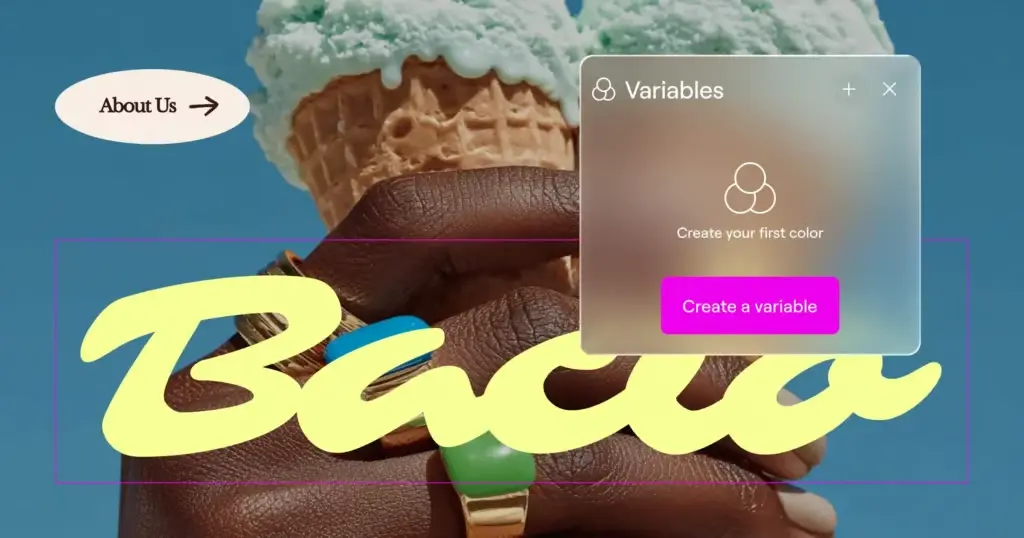
This creates a much more efficient workflow, especially for agencies and large-scale projects where design consistency is critical.
Variables also bring Elementor closer to professional design token systems used in advanced UI design and front-end development. They make websites easier to maintain, faster to edit, and significantly more scalable over time.
Build Once, Style Everywhere with Classes
Imagine designing a large website with dozens or even hundreds of buttons, cards, banners, and UI elements that all need to maintain the same visual style. In older workflows, updating those styles often meant editing each element individually or relying on complicated workarounds.
Elementor’s new Classes system completely changes that workflow by introducing a smarter, more scalable way to manage design consistency across your website.
Why Classes Matter in Modern Web Design
The new Classes system helps designers work faster, stay organized, and maintain a more professional workflow. Once a class is created, every connected element automatically inherits those styles.
With Global Classes, you can:
- Create reusable styling systems for buttons, cards, sections, forms, and more
- Update styles globally from one place instead of editing elements one by one
- Maintain consistent branding and visual identity throughout the website
- Reduce repetitive design work and speed up development workflows
- Build cleaner and more scalable websites with better long-term maintainability
For agencies and large projects, this becomes a massive productivity boost.
Create Interactive Experiences with States (Pseudo-Classes)
Modern websites are no longer static. Users expect interactive experiences that respond naturally to their actions. Elementor’s new States system allows you to create those dynamic interactions visually without writing custom CSS or JavaScript.
Using States (Pseudo-Classes), you can define how elements behave when users interact with them.
For example, you can design:
- Hover animations for buttons and cards
- Focus styles for forms and input fields
- Active states for navigation menus
- Interactive transitions for UI components
- Dynamic visual feedback for user interactions
Manage Everything Easily with the Class Manager
As websites grow larger, managing styles can quickly become overwhelming. Elementor solves this with the new Class Manager, a centralized control panel for organizing and maintaining all your Global Classes.
The Class Manager gives you complete control over your styling system by allowing you to:
- View all Global Classes in one organized location
- Rename or delete classes easily
- Reorder class hierarchy using drag-and-drop controls
- Manage class priority and inheritance visually
- Keep your design system clean, structured, and scalable
The introduction of Classes, States, and the Class Manager moves Elementor much closer to modern front-end development practices used in tools like Webflow, Framer, and advanced CSS frameworks.
A Smarter and More Consistent Design Workflow with the Unified Style Tab
Elementor 4 introduces a completely redesigned editing experience with the new Unified Style Tab. Unlike the older V3 system where every widget had its own unique styling structure and scattered controls, the new approach creates a standardized styling experience across all Elementor Atomic Elements.
This means designers no longer need to relearn different styling panels for different elements. Functional and content-related settings are now separated into the General Tab, while all visual customization controls are organized neatly inside a dedicated Style Tab. The result is a much cleaner and more intuitive workflow that feels faster and easier to manage.
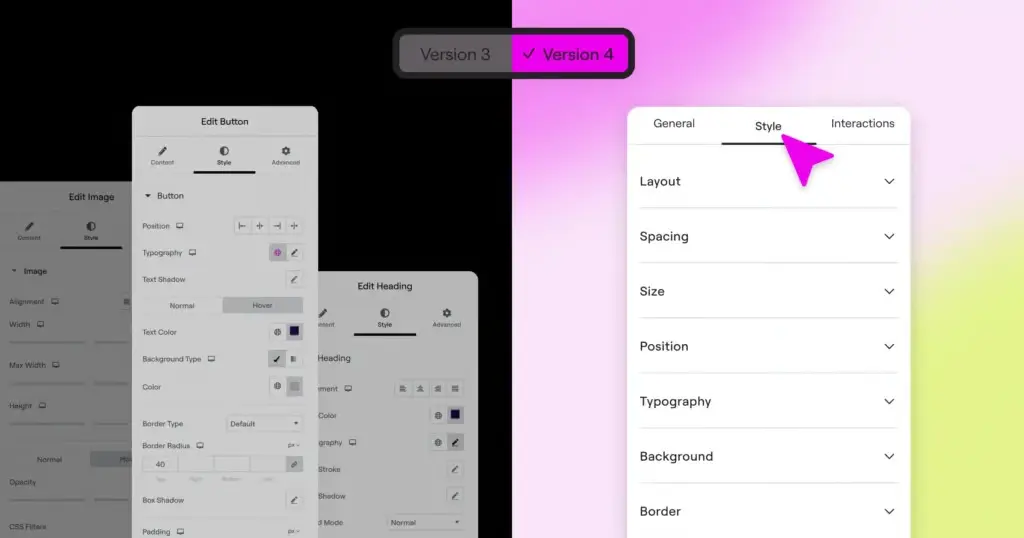
Because the styling system remains consistent throughout the editor, users can work more efficiently and focus on creativity instead of navigating different interfaces. Once you understand how the system works for one element, the same workflow applies everywhere else.
This unified approach not only speeds up website building but also creates a more professional and scalable design environment for modern WordPress projects.
Components and Reusable Layout Systems
One of the most exciting additions to Elementor 4.0 is the introduction of Components. Components allow users to create reusable layouts and design blocks that can be used throughout a website.
Unlike older global widgets, components are more flexible and more intelligent. Designers can lock certain design structures while still allowing editable content areas.
This creates enormous advantages for agencies and client-based workflows.
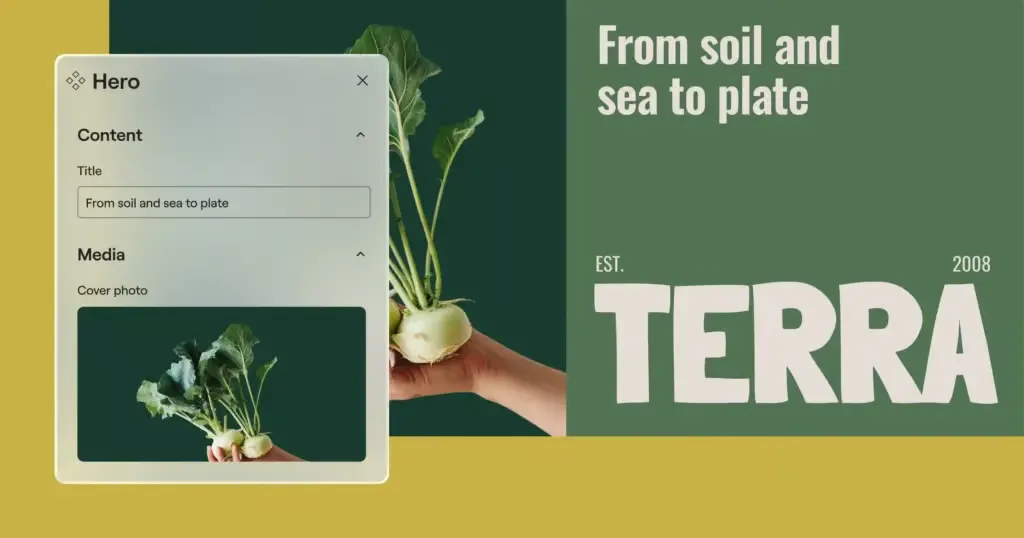
For example, an agency can create reusable testimonial sections, pricing tables, CTA blocks, team layouts, or animated hero sections. The structure and styling remain protected while clients can safely edit text and content without breaking the design.
This component-driven approach is heavily inspired by modern front-end frameworks like React and modern UI systems. It helps websites become more scalable, easier to manage, and more organized over time.
Advanced Responsive Control for Every Device
Elementor V4 introduces a far more powerful and flexible approach to responsive design, giving creators complete control over how every element appears across different screen sizes.
Unlike older workflows where only selected settings could be adjusted responsively, the new Atomic system allows virtually every styling property to be customized independently for desktop, tablet, and mobile devices.
This creates a much more precise editing experience. Designers can now tailor layouts, spacing, typography, sizing, positioning, and visual styles specifically for each device without relying on custom CSS or complicated workarounds. A section that looks bold and spacious on desktop can be redesigned into a cleaner, simplified mobile experience with full creative freedom.
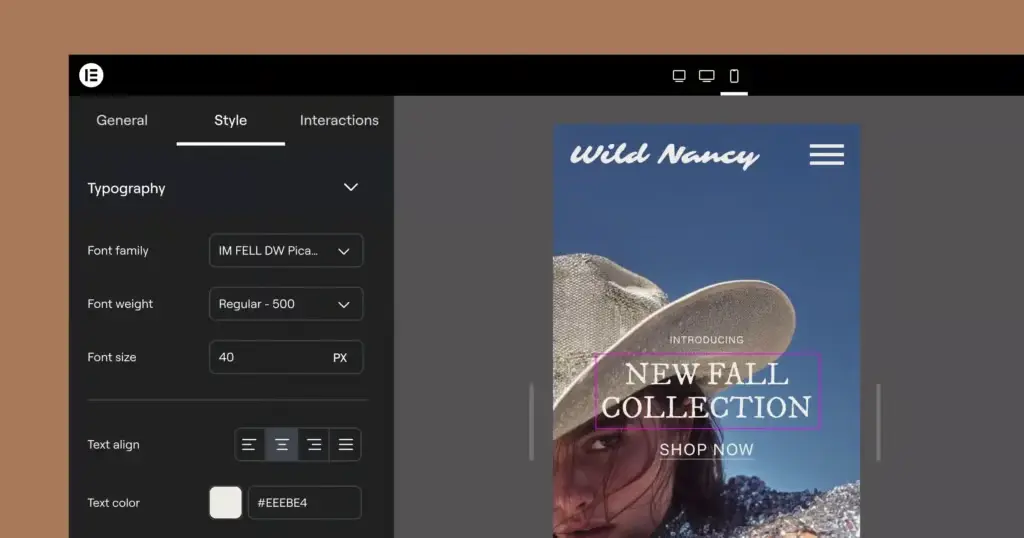
What makes the system even more intuitive is the device-specific editing mode built directly into the Top Bar. Switching between devices is no longer just a visual preview, it becomes an active editing environment where changes apply only to the selected screen size.
This allows designers to build truly optimized experiences for every device while maintaining smoother workflows and stronger responsive consistency throughout the website.
Cleaner DOM Structure for Faster and More Efficient Websites
One of the most impactful improvements in Elementor V4 happens behind the scenes with a much cleaner and lighter DOM structure. Earlier versions of Elementor often relied on multiple nested wrapper elements, which increased HTML complexity and added extra weight to web pages.
With the new architecture, each element now uses a simplified single-wrapper structure, creating significantly cleaner code output and a more optimized rendering process.
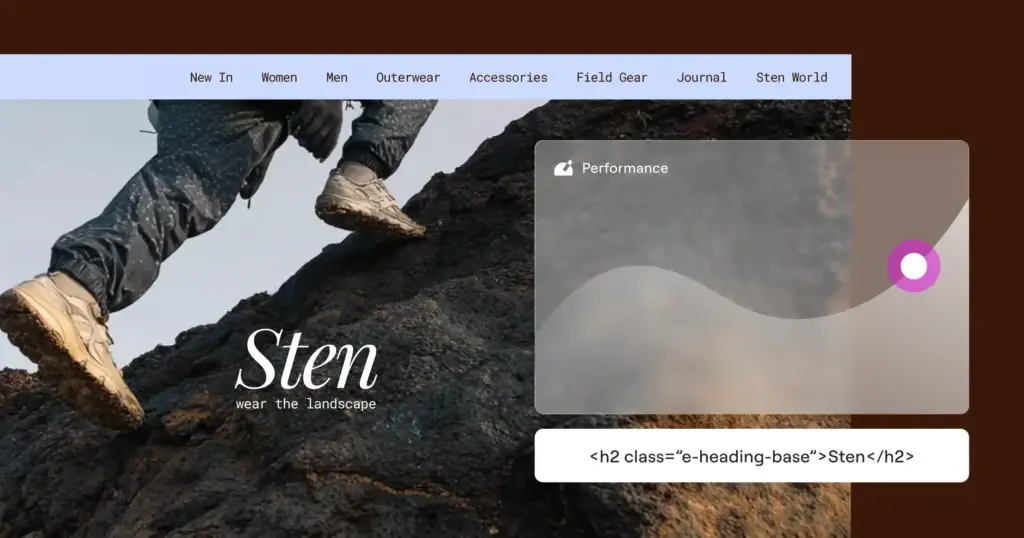
This approach reduces unnecessary page bloat and allows browsers to process layouts more efficiently. As a result, websites can load faster, respond more smoothly, and deliver a noticeably better browsing experience for visitors.
A cleaner DOM structure also improves maintainability, making websites easier to scale and optimize over time. Beyond performance gains, this optimization can positively influence SEO by helping pages achieve better speed and usability metrics.
For modern websites that rely heavily on animations, interactions, and dynamic content, a lighter structure becomes even more valuable because it creates a stronger technical foundation for smoother motion and improved responsiveness across devices.
Atomic Forms and Flexible Form Building
Elementor’s new Atomic Forms introduce a completely redesigned approach to form building that feels far more visual, flexible, and design-focused than traditional form systems.
Every part of the form, whether it’s an input field, label, checkbox, textarea, or submit button behaves like an independent building block that can be positioned and customized with complete freedom.
This modular approach makes form creation feel much more natural inside the editor. Designers are no longer restricted to rigid layouts or complicated settings panels.
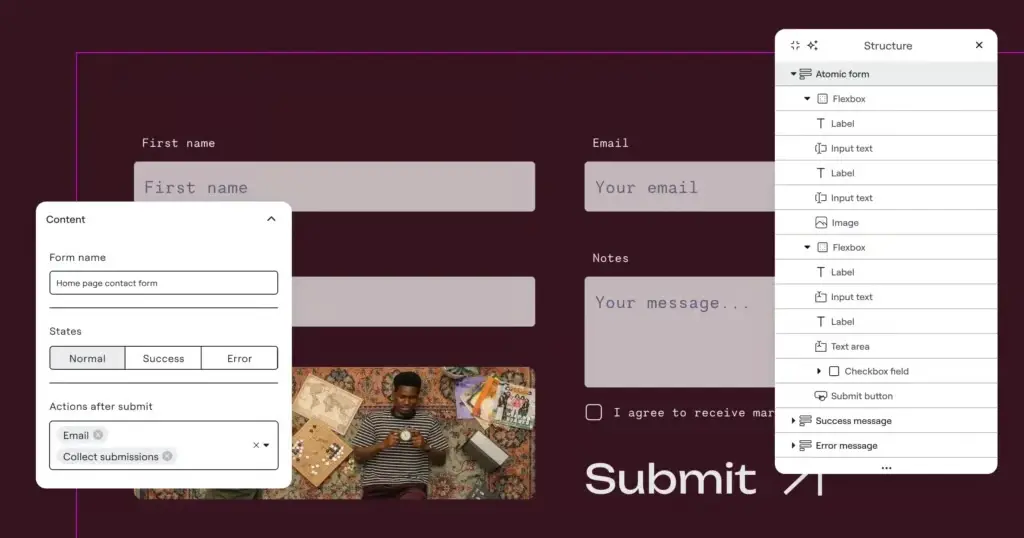
Since each form element integrates seamlessly with Elementor’s broader design system, users can style forms consistently using Global Classes, Variables, Components, and other Atomic Editor features. This creates a cleaner workflow while maintaining full design consistency across the website.
Another major advantage is layout flexibility. Designers can now place icons, images, headings, text blocks, and even additional containers directly inside the form structure.
This opens the door to more advanced multi-column layouts, highly customized lead-generation sections, and visually engaging form experiences that feel more integrated with modern website design.
Advanced Interactions That Respond to User Behavior
Elementor’s new Interactions system takes website animations far beyond simple entrance effects by allowing elements to respond dynamically to real user actions and scrolling behavior. Instead of motion happening only when a page loads, designers can now create experiences that feel more alive and interactive throughout the user journey.
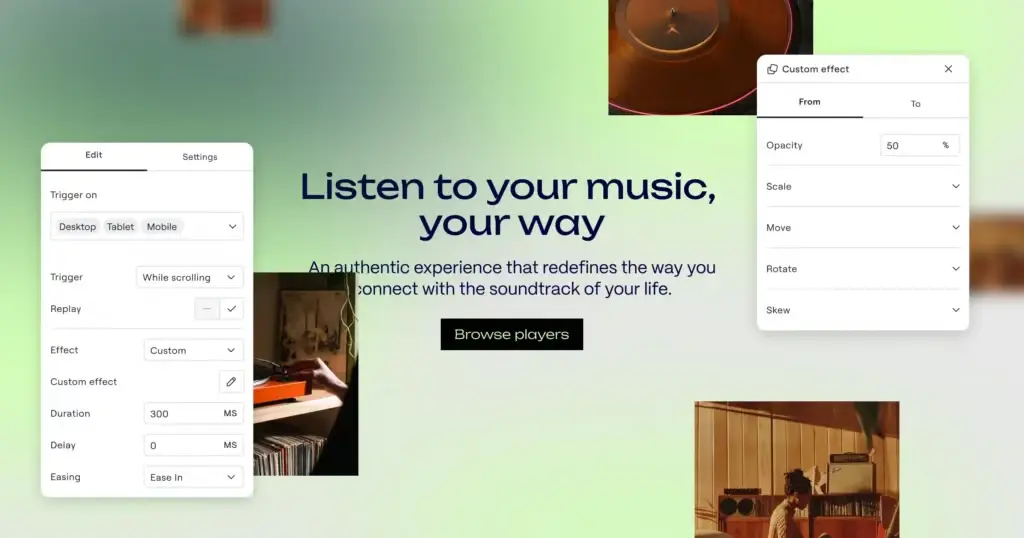
With the new trigger-based interaction system, elements can react intelligently to actions like scrolling, hovering, clicking, or entering specific sections of the page. This makes it possible to build immersive interfaces where cards respond on hover, content reveals smoothly during scroll, or components transition naturally based on user engagement.
What makes the system even more powerful is the introduction of Custom Effects, which provide much greater control over animations. Rather than relying solely on preset effects, designers can now define how elements transform, move, scale, or transition between states with far more creative freedom.
Elementor also allows interactions to be customized separately for desktop, tablet, and mobile devices. This ensures animations remain visually engaging on larger screens while staying lightweight, smooth, and performance-friendly on smaller devices.
How to Activate Elementor V4
Getting started with Elementor V4 is straightforward, and you don’t need to rebuild your existing website to try the new Atomic workflow. You can introduce V4 gradually while continuing to use your existing Elementor 3.x content.
Step 1: Update Elementor
Before activating V4, make sure your site is running Elementor Core 3.29 or higher. If you use Elementor Pro, keep both Elementor and Elementor Pro updated to compatible versions. Elementor currently recommends keeping both plugins up to date to avoid compatibility issues.
- Tip: Also make sure your WordPress installation meets Elementor’s current system requirements before updating.
Step 2: Back Up Your Website
Before enabling a new editing experience, create a complete backup of your website. This gives you a restore point if something doesn’t work as expected.
For a production website, it’s even better to test V4 on a staging environment first. Elementor also recommends backing up before major updates or changes.
Step 3: Open the Atomic Editor Settings
From your WordPress dashboard, go to:
- WP Admin → Elementor → Editor → Settings → Atomic Editor
This is where you can manage the V4 experience on an existing Elementor website.
Step 4: Activate Elementor V4
Inside the Atomic Editor tab, click Try out the new experience to activate the V4 workflow.
Once enabled, Elementor adds the new Atomic Elements to your editing experience while keeping your existing V3 content intact.
- Good to know: You don’t have to migrate everything at once. Elementor V4 is designed to work alongside existing V3 widgets and layouts, allowing you to transition at your own pace.
Step 5: Open a Page in Elementor
Open any page and launch the Elementor Editor.
You’ll notice the V4 Atomic Elements available in the Elements panel. Start with a simple page or section rather than immediately changing a critical production page.
This gives you a low-risk way to understand the new workflow.
Step 6: Test Atomic Elements
Try building a small section using the new V4 workflow.
Experiment with:
- Atomic Elements for cleaner building blocks
- Classes for reusable styling
- Variables for consistent design values
- Components for reusable sections and layouts
- Responsive controls for device-specific styling
- Interactions for dynamic experiences
The goal isn’t simply to see what’s new, it’s to understand how the Atomic workflow changes the way you build and manage a website.
Step 7: Check Your Existing V3 Content
Finally, review your existing pages, widgets, starter templates, forms, and third-party elementor v4 addons.
The good news is that existing V3 layouts don’t need to be rebuilt. Elementor V4 is designed to work alongside the legacy workflow, so you can gradually introduce Atomic Elements where they make sense.
Pay particular attention to:
- Existing widgets
- Custom CSS
- Forms
- Third-party addons for elementor v4
- Responsive layouts
- Dynamic content
- Header and footer templates
Elementor V4 Free vs Pro
Elementor V4 brings the new Atomic workflow to the core Elementor experience, so you can start exploring Atomic Elements, Classes, Variables, and the modern design-system approach without automatically needing Pro. However, Pro remains valuable if you need advanced website-building capabilities beyond the core editor.
| Feature | Elementor Free | Elementor Pro |
|---|---|---|
| Atomic Elements | ✓ | ✓ |
| Classes | ✓ | ✓ |
| Variables | ✓ | ✓ |
| Responsive styling | ✓ | ✓ |
| Components | Limited/plan-dependent | ✓ |
| Advanced widgets & features | — | ✓ |
| Advanced Forms | — | ✓ |
| Dynamic & marketing features | — | ✓ |
Elementor V4 Limitations
Elementor V4 brings a more structured and scalable way to build websites, but it’s not a complete replacement for every V3 workflow yet. Understanding its limitations can help you decide where to use V4 and where your existing setup may still be the better choice.
- Learning curve: Classes, Variables, and Components introduce a new way of thinking about page building, so beginners may need time to adjust.
- Not everything is V4-native: Some familiar widgets and workflows still rely on the traditional V3 system.
- Addon compatibility: Third-party Elementor addons may not fully support V4’s Atomic workflow, so testing is important before switching on a production site.
- Gradual migration: Existing websites don’t need to be rebuilt, but adopting V4 across an established site can require careful planning.
- Feature evolution: Elementor V4 is still expanding, so some capabilities and workflows may change as new releases arrive.
- Advanced features may require Pro: Some functionality isn’t included in the free version, which can matter for complex client or business websites.
- Not an automatic speed boost: V4’s architecture can support cleaner, more efficient websites, but actual performance still depends on hosting, assets, elementor v4 plugins, scripts, and implementation.
Should You Use Elementor V4?
Elementor V4 is a strong choice for new projects, scalable websites, and teams that want a more organized design workflow. However, existing websites don’t always need an immediate switch.
Use Elementor V4 if you:
- Start a new website – Build with the latest workflow from day one.
- Build client websites – Create reusable styles and components faster.
- Manage large websites – Keep layouts and styles easier to maintain.
- Use design systems – Manage Classes and Variables consistently.
- Want cleaner workflows – Reduce repetitive styling and editing.
- Plan for long-term scalability – Build a foundation that’s easier to expand.
- Don’t mind learning a new workflow – V4 introduces a different way of building websites.
Stick with your current V3 workflow if you:
- Already have a stable website – There’s no need to change what already works.
- Depend on specific V3 widgets – Keep your existing setup until compatibility is confirmed.
- Use critical third-party addons – Test them before switching your workflow.
- Don’t need V4 features yet – Upgrade when the new tools offer a clear benefit.
- Manage a production website – Avoid unnecessary changes that could disrupt the site.
- Prefer your existing workflow – There’s no need to rush into a new editing system.
💡
The Bottom Line
Starting fresh? Choose V4.
Managing a stable V3 site? Test V4 gradually before making major changes.
What’s New in Elementor 4.1 and 4.2?
Elementor 4.1 and 4.2 build on the Atomic Editor by making it more scalable, flexible, and practical for real-world websites.
Elementor 4.1: Better Design Systems & AI Workflows
Elementor 4.1 focuses on scaling your design workflow. You can now manage Classes and Variables from a unified panel, import/export design systems, duplicate styles, and use Angie AI to generate Classes, Variables, Components, Forms, and Tabs. Atomic Forms also gain new fields such as Select, Date Picker, Time Picker, and File Upload.
Elementor 4.2: More Powerful Layouts & Dynamic Content
Elementor 4.2 brings CSS Grid and Loops directly into the Atomic Editor, making it easier to create complex layouts and dynamic content without leaving the design system. It also improves Atomic Forms, accessibility, nested-container performance, and Angie AI’s ability to generate complete Loop structures and reusable Components.
In short: 4.1 makes Elementor V4 easier to manage and scale, while 4.2 makes it more powerful for advanced layouts and dynamic websites.
Final Thoughts
Elementor V4 isn’t simply a redesigned Elementor interface, it changes the underlying workflow from individually styled widgets toward reusable design systems.
The smarter approach is gradual adoption: test V4 on staging, introduce Atomic Elements where they provide a clear advantage, and keep your existing V3 workflow where necessary.
The real question isn’t whether Elementor V4 is the future, it already is. The question is where its Atomic workflow makes the biggest difference to your next WordPress project.
FAQs
Elementor V4 is the latest generation of Elementor’s editor, built around a more modular, CSS-first approach with reusable Classes, Variables, Components, and Atomic Elements. It is designed to make websites easier to build, style, maintain, and scale.
Yes, Elementor V4 is part of the Elementor editor and does not require a separate V4 subscription. Elementor Pro continues to provide additional advanced capabilities on top of the core plugin.
Essentially, yes, the Atomic Editor is the foundation of Elementor V4’s new editing experience. It introduces Atomic Elements and a unified system for Classes, Variables, Components, and styling.
V3 primarily uses individual widget settings, while V4 introduces a more standardized workflow based on Classes, reusable styles, and Atomic Elements. V4 also provides a more unified styling interface and responsive editing approach.
You don’t need to rebuild a stable website just to use V4, as existing V3 content can continue working alongside V4 features. For production sites, it’s best to back up and test the new workflow before adopting it more broadly.
Yes, V4 is designed to work alongside existing Elementor 3.x content without requiring existing layouts to be converted. You can even use V3 containers and V4 Atomic Elements together on the same page.
Yes, Atomic Elements can be used alongside existing V3 widgets and containers. This hybrid approach lets you introduce V4 features gradually rather than replacing your entire site at once.
Classes are reusable styling systems that let you apply the same design rules to multiple elements. Instead of styling each element individually, you can update a class and apply the change wherever that class is used.
Variables are reusable values such as fonts, colors, or sizes that can be referenced throughout your design system. Changing a variable can update the elements that use it, making global design changes much easier.
Components are reusable design structures that allow you to create consistent sections or patterns and reuse them across a website. They are particularly useful for scalable websites, agencies, and projects that rely on repeatable layouts.
V4 is built around a performance-focused architecture with cleaner, more modular elements and less unnecessary markup. However, real-world speed still depends on factors such as hosting, images, plugins, fonts, scripts, and how the website is built.
V4’s lighter architecture and performance improvements can contribute to better website performance, but they do not automatically guarantee better Core Web Vitals. Your overall page structure, assets, hosting, third-party scripts, and optimization practices still have a major impact.
First, update Elementor Core to version 3.29 or higher, then go to WP Admin → Elementor → Editor → Settings → Atomic Editor and select Try out the new experience. After activation, open the Elementor Editor to start using V4 Atomic Elements.
No, Elementor V4 itself does not require a separate Pro subscription, and the core V4 experience is available through Elementor Core. However, some advanced features and capabilities remain available through Elementor Pro.
Yes, Elementor V4’s atomic foundation is intended for real websites, and V4 is now the default experience for new Elementor installations. Existing websites can adopt V4 gradually while continuing to use their existing V3 workflows.
Elementor 4.2 expands the Atomic Editor with features including CSS Grid and Loops, while also improving Atomic Forms, accessibility, performance, and stability. These additions extend the V4 system beyond basic elements into more advanced layout and dynamic-content workflows.


Leave a Reply