
 Login
Login


Elementor V4 Atomic Editor is Elementor’s new CSS-first website-building system. Instead of styling every widget individually, V4 uses Atomic Elements, Classes, Variables and Components to create reusable design systems that scale across a website.
Elementor V4 is now live, and existing websites can adopt the new workflow gradually without rebuilding everything from scratch. In this guide, we’ll explain what’s changed, how the Atomic Editor works, what it means for performance and SEO, its current limitations, and whether you should use it.
Elementor V4 Atomic Editor is Elementor’s new CSS-first editing system that replaces repetitive, widget-by-widget styling with a more structured approach.
It uses Atomic Elements, Global Classes, Variables, a unified Style Tab, and States to help you create consistent designs, make site-wide changes faster, and maintain websites more easily. The system is optional and can be adopted gradually alongside existing widgets.
Key Takeaways
- CSS-first workflow: Elementor V4 shifts styling from repetitive widget-level settings toward reusable CSS-based design rules.
- Reusable design system: Atomic Elements, Global Classes, and Variables help maintain consistent styles across your website.
- Faster site-wide changes: Update a class or variable once and apply the change across multiple elements.
- Better scalability: The structured approach makes large websites easier to build, maintain, and keep visually consistent.
- Gradual transition: You can adopt the Atomic Editor alongside existing widgets instead of rebuilding your entire website at once.
What is the Elementor V4 Atomic Editor?
The Elementor V4 Atomic Editor is a CSS-first editing system designed to make website building more structured, reusable, and scalable. Instead of styling every widget individually, it uses Atomic Elements, Classes, Variables, and States to create a more consistent design workflow.
This approach reduces repetitive styling and makes site-wide design changes easier to manage. It also allows you to adopt the V4 workflow gradually alongside existing Elementor elements.
- Note
- New to the bigger picture? See our overview of Elementor V4 vs Elementor 3 for how the whole release fits together.
What Changed in Elementor V4?
| Elementor V3 | Elementor V4 |
|---|---|
| Widget-focused styling | Atomic Elements |
| Individual styles | Classes |
| Repeated values | Variables |
| Widget-specific controls | Unified Style system |
| Larger widget structures | Lightweight Atomic Elements |
| Manual reuse | Components |
| Legacy layout workflow | More modular structure |
| Limited responsive controls | Responsive styling across properties |
| Third-party interactions | Native V4 Interactions |
How Does the Atomic Editor Work?
Elementor V4’s Atomic Editor changes the way you build and style pages. Instead of treating every widget as an isolated design, it encourages you to combine small building blocks, reusable styles, shared values, and reusable components to create a consistent design system.
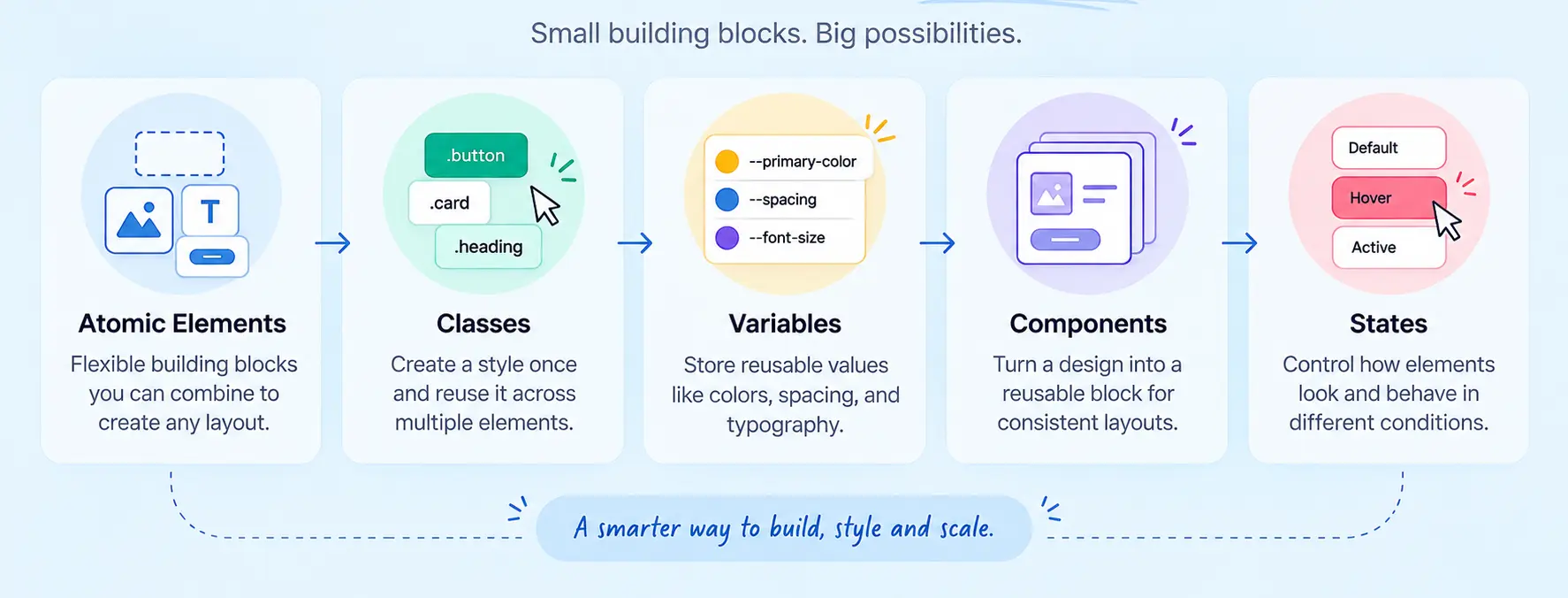
Think of it like building with a design toolkit: Atomic Elements create the structure, Classes control reusable styles, Variables store shared values, Components package reusable designs, and States handle different interactions.
Atomic Elements
Atomic Elements are the building blocks of the V4 workflow. They provide smaller, flexible elements that you can combine to create layouts without depending entirely on large, predefined widgets.
Why it matters: You get more control over your page structure and can create designs that are easier to customize and maintain.
Classes
Classes let you create a style once and reuse it across multiple elements. For example, a .primary-button class can define the appearance of your CTA buttons, so changing the class updates every button using it.
Why it matters: You avoid repetitive styling and can make site-wide design changes much faster.
Variables
Variables store reusable design values such as colors, typography, spacing, or other style properties. Instead of entering the same value repeatedly, you can reference one variable wherever that value is needed.
Why it matters: Change a variable once and keep your design consistent across the site.
Components
Components allow you to turn a reusable design structure into a repeatable building block. This is useful when the same pattern such as a card, CTA section, or content block, needs to appear in multiple places.
Why it matters: Components can reduce repetitive work and make larger websites easier to manage consistently.
States
States let you define how an element behaves or looks under different conditions, such as hover. Instead of treating each interaction as a separate styling task, you can manage these variations within the same styling workflow.
Why it matters: You can create more interactive designs while keeping their styling organized.
How the Pieces Fit Together
| Atomic Editor Feature | What It Does | Simple Example | Main Benefit |
|---|---|---|---|
| Atomic Elements | Provides flexible building blocks | Heading + Image + Button | More control |
| Classes | Reuses styling rules | .primary-button | Faster updates |
| Variables | Stores reusable values | Brand color | Consistency |
| Components | Reuses complete design patterns | Product card | Less repetition |
| States | Controls different element conditions | Button hover | Better interaction |
Elementor V4 Features You Should Know
The Atomic Editor is only part of the broader V4 experience. Elementor V4 also introduces or expands tools that give you more control over styling, responsive layouts, grids, dynamic content, interactions, and editing.
Unified Style System
The Unified Style System brings styling into a more consistent workflow, making it easier to manage properties without jumping between disconnected controls.
Combined with Classes and Variables, it helps you move from one-off styling toward a reusable design system.
Responsive Controls
Responsive controls help you adapt your designs across different screen sizes. Instead of treating desktop as the starting point for everything, you can adjust relevant styling properties to create layouts that work across desktop, tablet, and mobile.
User benefit: Build once, refine for each screen, and avoid unnecessary device-specific work.
Grid
CSS Grid gives you another way to structure complex layouts with greater control over rows and columns. It’s particularly useful when a simple flex-based layout isn’t enough for the design you have in mind.
User benefit: Create sophisticated layouts without having to rely on complicated workarounds.
Loop
Loop lets you create repeatable layouts for dynamic content. You can design a single structure and use it as a pattern for displaying multiple pieces of content.
User benefit: Build dynamic listing layouts without manually designing every repeated item.
Interactions
Interactions add behavior and motion to elements, helping you create more engaging experiences. They can be used to make pages feel more responsive and interactive rather than purely static.
User benefit: Add meaningful interaction where it improves the user’s experience—not just animation for decoration.
Inline Editing
Inline editing lets you work more directly with content within the editor. Rather than constantly moving between separate controls and the page, you can make content adjustments closer to where you see the result.
User benefit: Faster visual editing with less back-and-forth.
Elementor V4 Features at a Glance
| Feature | Purpose | Best For | User Benefit |
|---|---|---|---|
| Unified Style System | Centralizes and organizes styling | Consistent designs | Easier style management |
| Responsive Controls | Adjust designs for different screens | Responsive websites | Better mobile experience |
| Grid | Creates row-and-column layouts | Complex page structures | Greater layout control |
| Loop | Creates repeatable dynamic layouts | Posts, products, listings | Less manual work |
| Interactions | Adds interactive behavior | Engaging interfaces | More dynamic experiences |
| Inline Editing | Edit content more directly | Faster content updates | Quicker workflow |
The Big Picture
The real value of Elementor V4 isn’t any single feature. It’s how these features work together: Atomic Elements give you flexible building blocks, Classes and Variables create consistency, Components encourage reuse, and tools such as Grid, Loop, Interactions, and responsive controls give you more ways to build the final experience.
In short, V4 moves Elementor closer to a reusable design-system workflow, helping you build websites that aren’t just easier to create, but easier to manage as they grow.
Elementor V3 vs V4: What’s the Difference?
The biggest change from Elementor V3 to V4 is the shift from a widget-first approach to a more structured, reusable, CSS-first workflow. V3 is familiar and flexible for traditional Elementor building, while V4 introduces Atomic Elements, Classes, Variables, States, and a more unified styling system.
If you’re wondering whether Elementor V4 is worth upgrading to, the answer depends on your website. New projects can benefit from starting with V4, while existing sites should test compatibility and migrate gradually rather than rebuilding everything at once.
Elementor V3 vs V4: At a Glance
| Feature | Elementor V3 | Elementor V4 |
|---|---|---|
| Core approach | Widget-focused website building | Atomic, CSS-first website building |
| Building blocks | Primarily widgets and containers | Atomic Elements and reusable components |
| Styling | Often configured element by element | More focused on reusable Classes and Variables |
| Global styling | Global settings and widget-level controls | Classes and Variables create a more systematic design system |
| Design consistency | Requires careful reuse of existing styles | Reusable styles make consistency easier |
| CSS workflow | CSS knowledge is helpful but not central | CSS concepts are more closely integrated into the workflow |
| States | Styling states can depend on individual element controls | States are handled within the unified styling approach |
| Site-wide changes | May require editing multiple elements/settings | Update reusable Classes or Variables to make broader changes |
| Learning curve | Familiar to existing Elementor users | Requires learning a new design-system mindset |
| Existing websites | Mature workflow for established sites | Can be introduced gradually alongside existing V3 elements |
| Addon considerations | Broad ecosystem built around the established workflow | Compatibility should be checked before adopting V4 across an existing site |
| Best suited for | Existing Elementor workflows and legacy projects | New builds and scalable, system-based websites |
What Actually Changed?
V3: You typically think, “How should I style this widget?”
V4: You start thinking, “What style system should this element use?”
That distinction is the heart of the V4 experience. Instead of repeatedly styling individual elements, you can create reusable rules with Classes and Variables, while Atomic Elements provide smaller building blocks for constructing layouts.
Should You Upgrade From Elementor V3 to V4?
Starting a new website – V4 is worth exploring from the beginning because you can establish Classes, Variables, and reusable styles before the site becomes difficult to manage.
Already running a large V3 website – Don’t rush into a complete rebuild. Test V4 on a staging copy, check your existing widgets and addons, and introduce the new workflow gradually.
The key takeaway: Elementor V4 isn’t simply a visual redesign of V3. It’s a change in how you think about building and maintaining an Elementor website, from repeatedly styling individual elements to creating a reusable design system.
Benefits of Elementor V4 Atomic Editor
Pulling it together, here’s what the Atomic Editor actually improves based on Elementor’s documented goals for the release.
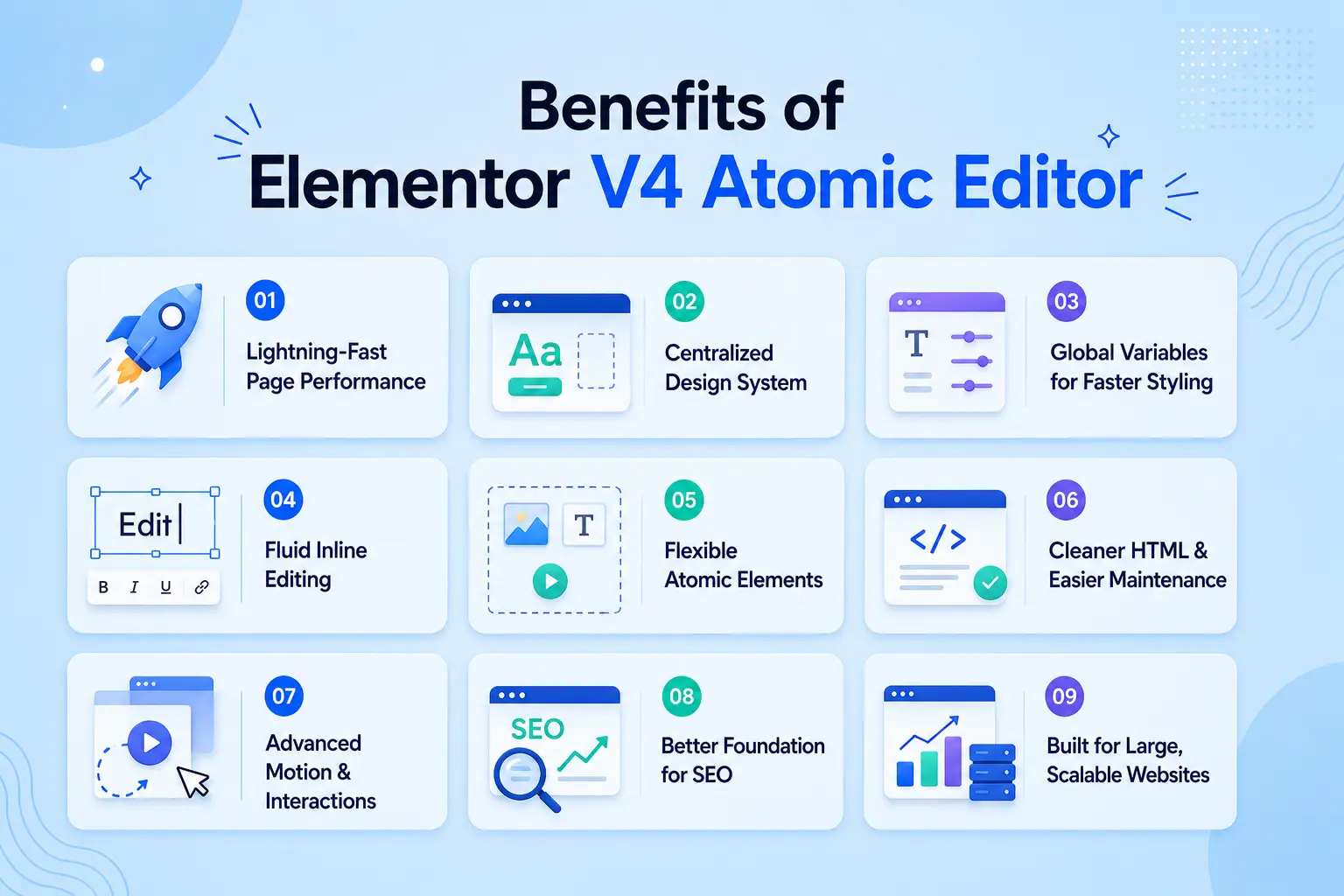
1. Lightning-Fast Page Performance
Elementor V4 reduces unnecessary nested HTML wrappers, creating a cleaner DOM and lighter CSS output. This allows browsers to render pages more efficiently, improving page speed and providing a stronger foundation for Core Web Vitals.
2. Centralized Design System
Global Classes let you create reusable styles for buttons, headings, cards, and other elements. Update a Class once, and every instance updates automatically, keeping your website visually consistent while saving hours of manual work.
3. Global Variables for Faster Styling
Global Variables centralize design tokens like colors, typography, spacing, and sizing. Instead of editing individual widgets, you can make one change and apply it across your entire website.
4. Fluid Inline Editing
The new inline editing experience lets you edit text directly on the canvas with a contextual floating toolbar. This reduces unnecessary clicks and creates a faster, more intuitive editing workflow.
5. Flexible Atomic Elements
Atomic Elements replace large, all-in-one widgets with smaller, reusable components. Features like Atomic Tabs allow you to insert virtually any content inside tab panels, giving you greater design flexibility.
6. Cleaner HTML & Easier Maintenance
A simplified HTML structure makes websites easier to debug, customize, and maintain. Combined with Global Classes and Variables, Elementor V4 reduces duplicated styles and minimizes design inconsistencies across large websites.
7. Advanced Motion & Interactions
Elementor V4 expands its built-in animation capabilities with richer entrance effects and advanced sticky interactions. Many visual effects that previously required third-party addons can now be created natively.
8. Better Foundation for SEO
The Atomic Editor doesn’t directly improve rankings, but its cleaner code and reduced DOM size can contribute to faster loading pages and better Core Web Vitals, supporting your overall SEO strategy.
9. Built for Large, Scalable Websites
Whether you’re managing a portfolio, an eCommerce store, or multiple client projects, the Atomic Editor makes large websites easier to update. Shared Classes and Variables ensure design changes remain consistent as your site grows.
Who Benefits Most from Elementor V4 Atomic Editor?
- Freelancers managing multiple client sites
- Web design agencies maintaining design systems
- WooCommerce stores with hundreds of pages
- Marketing teams updating landing pages frequently
- Developers building scalable Elementor websites
- Existing Elementor users planning to upgrade to V4
How to Enable Elementor V4 Atomic Editor
Ready to try Elementor V4? You don’t need to rebuild your website or switch everything at once. The safest approach is to back up your site, enable the Atomic Editor, test your existing setup, and adopt the new workflow gradually.
Step 1: Update Elementor
Before enabling V4, make sure Elementor is updated to the version that supports the Atomic Editor. Keeping Elementor up to date also helps reduce compatibility issues during testing.
Step 2: Create a Backup or Staging Copy
Don’t experiment directly on a critical live website. Create a full backup or, ideally, test V4 on a staging site first. This gives you a safe environment to check your layouts, widgets, templates, and addons.
Step 3: Open Elementor Settings
From your WordPress dashboard, go to:
WordPress Admin → Elementor → Editor → Settings
Look for the settings related to the Atomic Editor.
Step 4: Open Atomic Editor
Open the Atomic Editor section to review the available V4 settings. This is where you can control access to the new editing experience.
Step 5: Activate V4
Enable the Atomic Editor and save your settings. The change is optional and reversible, so you can explore the new workflow without committing your entire website to it immediately.
Step 6: Test Existing Widgets and Addons
Now comes the important part: test before you trust.
Check your:
- Existing Elementor widgets
- Templates and layouts
- Responsive designs
- Custom styling
- Third-party addons
- Interactive elements
Pay particular attention to addons that rely on older Elementor architecture, as compatibility can vary.
Step 7: Start Building With Atomic Elements
Once everything looks good, start using Atomic Elements, Classes, Variables, and States for new sections. Instead of changing every element individually, build reusable styles that can be managed from a central system.
The smart approach: Don’t migrate everything overnight. Start with a new section or low-risk page, learn the workflow, test the results, and expand gradually.
- Quick tip
- If you’re managing a live or large website, backup → staging → enable → test → adopt is a much safer V4 transition than making the switch all at once.
Should You Upgrade to Elementor V4?
| If you are… | Recommendation |
|---|---|
| Starting a new website | Use V4 |
| Building a large design system | Use V4 |
| Managing many client sites | Use V4 gradually |
| Running a legacy site | Test before migrating |
| Dependent on older addons | Check compatibility first |
| Happy with a stable V3 workflow | No rush, test V4 on staging |
Who Should NOT Upgrade Yet?
- sites heavily dependent on unsupported addons
- mission-critical websites without staging
- sites with custom widgets
- websites relying on legacy workflows
- teams that haven’t tested their production stack
Elementor V4 Limitations You Should Know
Elementor V4 brings a more structured, CSS-first way to build websites, but it isn’t a magic switch that makes every existing Elementor site instantly V4-ready. The biggest adjustment is learning a new styling mindset and understanding how the new system works alongside your existing widgets and addons.
Before moving a live site to V4, consider these limitations:
| Limitation | What It Means for You | What You Can Do |
|---|---|---|
| New styling mindset | Classes, Variables, and reusable styles work differently from traditional widget-by-widget editing. | Start with a small page or section and build your design system gradually. |
| V3 + V4 coexistence | Existing widgets and new Atomic Elements can live together, but they follow different styling approaches. | Identify which parts of your site use V3 and which use V4 before making major changes. |
| Addon compatibility | Older third-party addons may not fully support the V4 architecture or CSS-first workflow. | Check addon compatibility and test critical widgets on staging first. |
| Migration takes planning | Large websites don’t necessarily need—or benefit from—a complete rebuild just to use V4. | Adopt V4 progressively instead of replacing everything at once. |
| Learning curve | The Atomic approach requires thinking in reusable design rules rather than individual element settings. | Learn Classes, Variables, States, and Atomic Elements through smaller practical projects. |
| Not every workflow is identical | Some familiar V3 controls or workflows may work differently in V4. | Test your existing templates, responsive layouts, and custom styling before wider adoption. |
The goal isn’t to convert everything overnight, it’s to build a cleaner, more reusable system without disrupting the website that already works.
Atomic Editor and Animation: Where Motion Fits
The Atomic Editor solves styling and structure beautifully, but most sites also need motion, and that’s where the CSS-first model raises a practical question.
The problem: Animation depends on both clean markup and predictable styling. Older animation tools that hard-code styles or assume legacy markup can fight the very consistency the Atomic Editor creates.
Why does it matters: If your animation layer undoes the clean, scalable foundation you just built, you lose the benefit of going CSS-first in the first place.
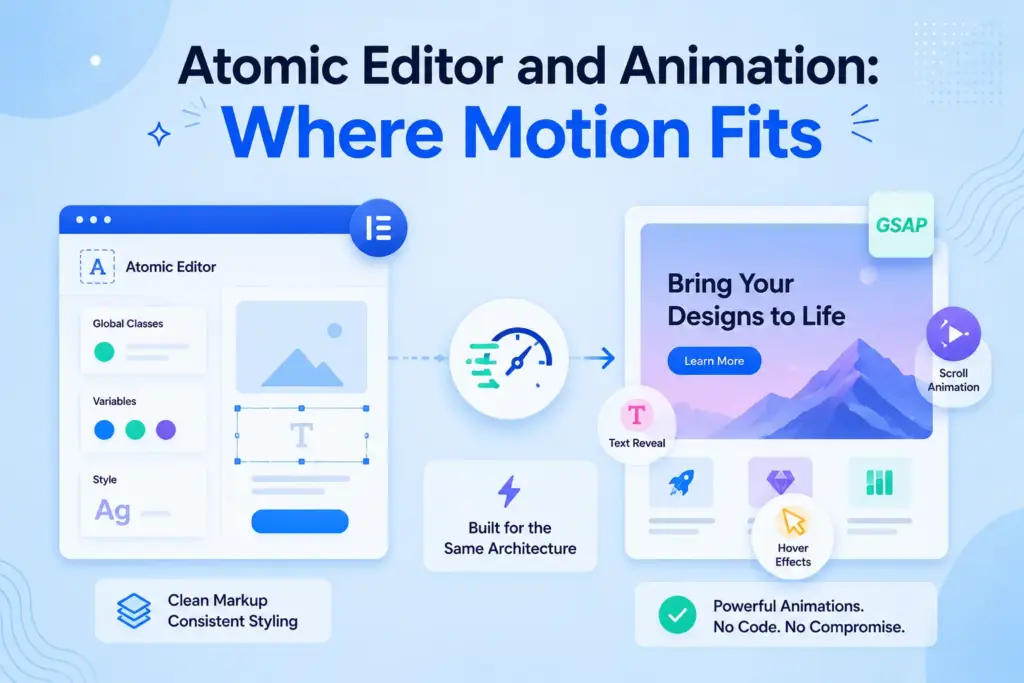
The solution: Pair the Atomic Editor with animation built for the same architecture. This is the gap Animation Addons for Elementor is designed to fill a V4-ready ecosystem with Atomic Widgets, Elementor V4 templates, and GSAP-powered, no-code motion that respects the clean DOM and styling model.
The benefit: You keep the consistency and maintainability of the Atomic Editor while adding scroll, text-reveal, hover, and page-load animations without writing custom code or compromising performance.
Curious about pricing and what’s included? See the Animation Addons pricing page.
Final Thoughts: Is the Atomic Editor Worth It?
The Elementor V4 Atomic Editor is the most meaningful change to Elementor in years, a move from one-off, per-element styling to a structured, CSS-first system built on Atomic Elements, Global Classes, and Variables.
For anyone managing growing sites like freelancers, agencies, and designers alike, the benefits are concrete: consistency, faster edits, cleaner output, and a real path toward design systems inside Elementor. The limitations are equally real but manageable, especially since the Atomic Editor is optional, reversible, and built to coexist with your current workflow.
If motion is part of your work, pairing the Atomic Editor with V4-ready animation completes the picture.
Need advanced animation for V4?
Animation Addons for Elementor is designed around modern animation workflows, GSAP-powered effects, and Elementor V4 compatibility.
Explore Animation Addons →FAQs
Elementor V4 Atomic Editor is a CSS-first website-building system designed around reusable styling and smaller building blocks. It uses Atomic Elements, Classes, Variables, and States to make websites easier to build, maintain, and scale.
Elementor V4 introduces a more structured styling workflow with Atomic Elements, Global Classes, Variables, a unified Style Tab, and improved state-based styling. These features help reduce repetitive styling and make design systems easier to manage.
The provided article does not specify whether all Elementor V4 features are available for free or require Elementor Pro. Check Elementor’s current official pricing and feature documentation before making a purchasing decision.
No, you don’t need to rebuild your entire website to explore the Atomic Editor. You can introduce V4 gradually while continuing to use existing Elementor widgets and workflows.
Yes, V3 widgets and V4 elements can coexist, allowing you to adopt the new workflow progressively. This makes V4 more practical for existing websites that aren’t ready for a complete rebuild.
The article recommends updating Elementor, creating a backup or staging copy, then going to Elementor → Editor → Settings → Atomic Editor and activating V4. After activation, test your existing layouts, widgets, and addons before using V4 extensively.
Compatibility can vary because some third-party addons may depend on the older Elementor workflow or architecture. Test your essential addons and widgets on a staging site before adopting V4 across an existing website.
V4’s Atomic approach can help create cleaner, less complex page structures by reducing unnecessary layers and repetitive styling. However, actual performance depends on your overall website, including widgets, addons, assets, hosting, and implementation.
Elementor V4 does not automatically improve search rankings, but its cleaner structure and performance-focused approach can provide a stronger technical foundation for SEO. You still need quality content, good site architecture, optimized performance, and other standard SEO practices.
Atomic Elements are smaller, flexible building blocks used to create Elementor V4 layouts without relying entirely on traditional widget structures. They give you more direct control over structure and styling while supporting a reusable design-system approach.
Classes let you reuse styling across multiple elements, while Variables store reusable values such as colors, spacing, or typography settings. Together, they make it easier to maintain consistent designs and apply site-wide changes efficiently.
If you’re starting a new website, V4 is worth exploring for its reusable, system-based workflow and modern styling approach. For an existing site, test it on staging first, especially if you rely heavily on third-party widgets or addons, then migrate gradually.


Leave a Reply