
 Login
Login


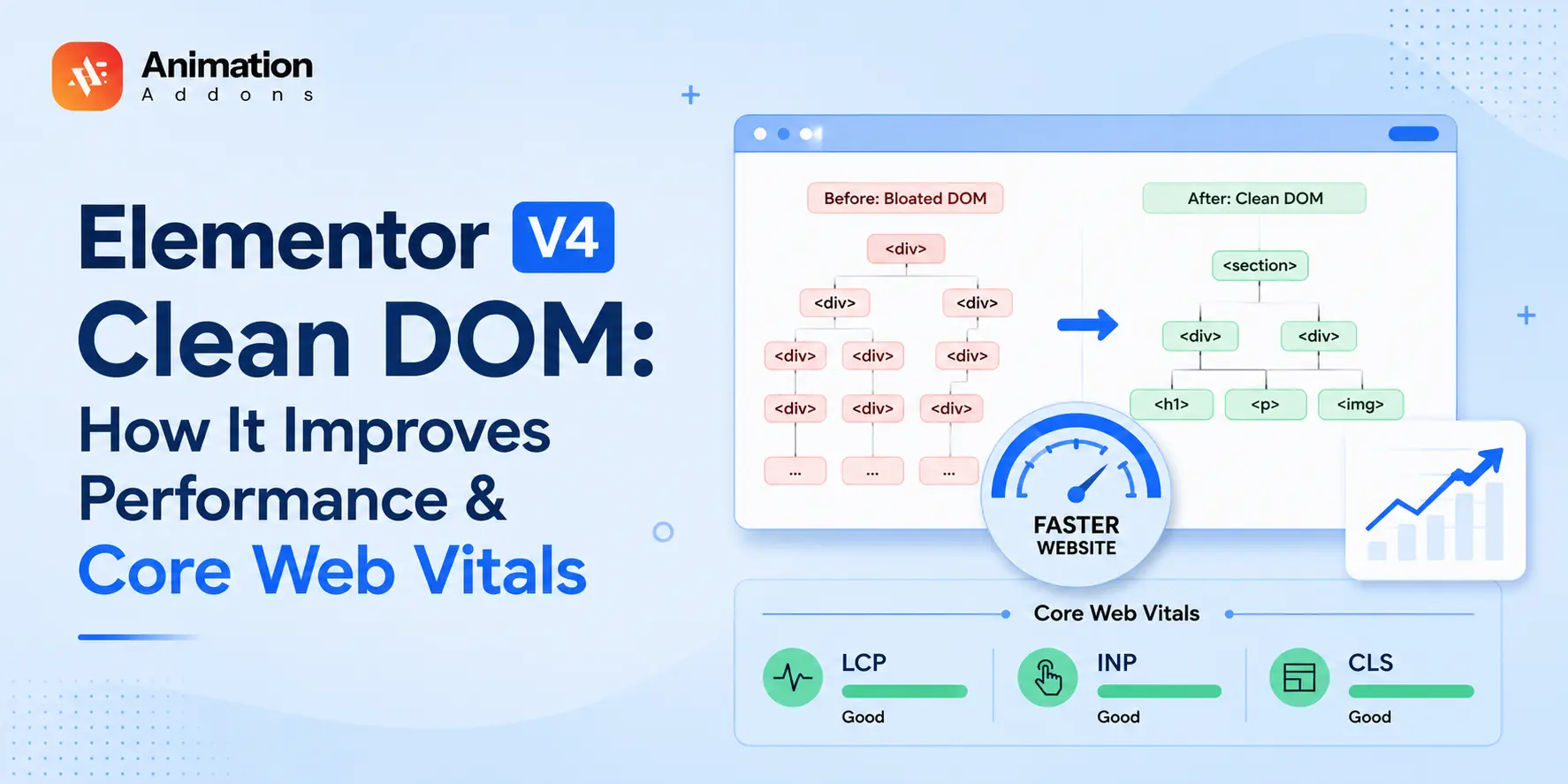
Elementor V4 clean DOM refers to the leaner HTML structure created by its new Atomic architecture. By reducing unnecessary wrapper layers and using a CSS-first system with reusable Classes and Variables, Elementor V4 can reduce DOM complexity and the amount of work browsers need to perform when rendering a page.
That doesn’t mean a clean DOM automatically makes every website fast. Images, JavaScript, CSS, third-party scripts and Elementor addons can still affect performance. But starting with lean markup gives your website a stronger performance foundation.
In this guide, you’ll learn what a clean DOM is, how Elementor V4 changes the markup structure, how to inspect your DOM, how DOM size affects performance and Core Web Vitals, and how addons can either preserve or undermine V4’s performance benefits.
Clean DOM in Elementor V4 means the Atomic Editor generates leaner, less-nested HTML than older Elementor versions.
Fewer wrapper elements mean a smaller DOM tree, which the browser can parse, style, and render faster. Combined with the CSS-first styling model, this improves load times, responsiveness, and Core Web Vitals making clean DOM one of the biggest performance advantages of Elementor V4.
Key Takeaways
- Clean DOM starts with fewer elements: A lighter HTML structure gives browsers less work to process and render.
- Older Elementor layouts often used extra wrappers: More nesting could increase page size and add unnecessary rendering overhead.
- Elementor V4 simplifies the structure: Atomic elements and CSS-first styling reduce repetitive markup and keep layouts cleaner.
- Cleaner markup supports better performance: A leaner DOM can improve loading, responsiveness, and Core Web Vitals.
- Your addons still affect the final result: Even with Elementor V4, poorly optimized addons can add unnecessary markup and reduce performance gains.
What is the DOM ?
The DOM (Document Object Model) is the browser’s live representation of your webpage. When someone opens an Elementor page, the browser turns the page’s HTML into a structured tree of elements such as headings, buttons, images, sections, and containers, that it can style, lay out, and display on the screen.
Think of the DOM as the blueprint the browser works from. The more unnecessarily complex that blueprint becomes, the more work the browser may need to do to render and update the page.
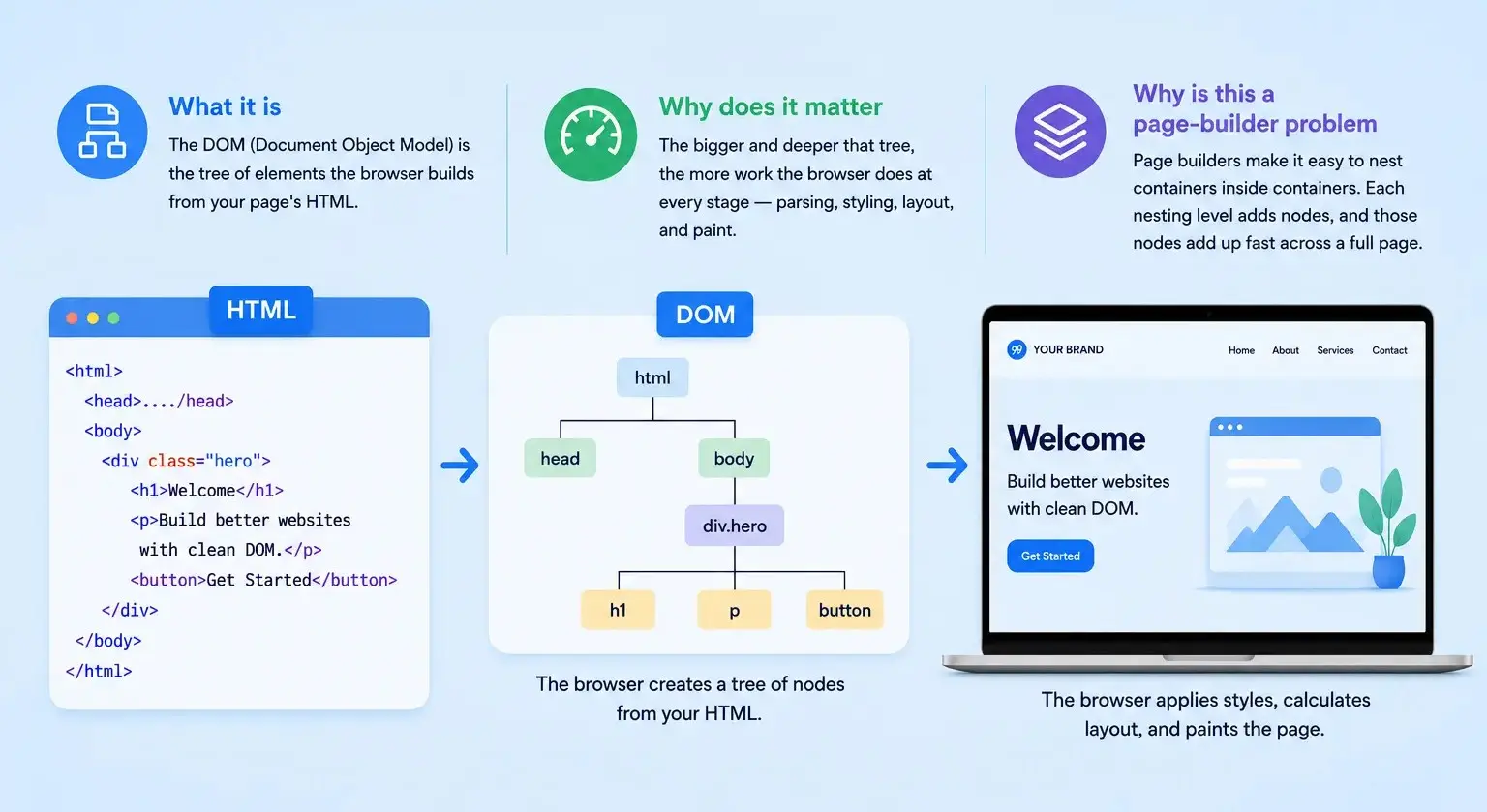
DOM vs HTML
HTML is the source code that describes your page, while the DOM is the structured representation the browser creates from that HTML. For example, a simple button may require only a few HTML elements, but additional wrappers and nested containers can make its DOM structure much deeper.
In Elementor, this distinction matters because two pages can look almost identical to visitors while having very different underlying DOM structures. Cleaner markup means fewer unnecessary layers for the browser to process.
Why DOM Size Matters
A large or deeply nested DOM can increase the browser’s workload during parsing, style calculation, layout, and rendering. This can become more noticeable on mobile devices or pages with complex layouts and interactions.
That doesn’t mean fewer DOM elements always equals a faster website. The goal is to remove unnecessary markup and excessive nesting while keeping the structure your design actually needs, one of the key performance advantages Elementor V4’s cleaner Atomic approach is designed to provide.
What “Clean DOM” Means in Elementor V4
Clean DOM isn’t a single setting, it’s the result of how Elementor V4 is built.
The problem with the old approach: In earlier Elementor versions, achieving a layout often meant multiple wrapper elements around your actual content. That flexibility was useful, but it produced a deeper, heavier DOM tree than the design strictly needed.
What Elementor V4 does differently: The Atomic Editor is designed around a CSS-first model, using lighter building blocks and reusable styling instead of stacking wrappers. Elements like the Div Block are, by Elementor’s own description, lightweight containers that load faster than heavier alternatives, so you get the structure you need with fewer nodes.
Why does it matter: Fewer wrapper elements mean a shallower, smaller DOM. That’s less HTML to download and less work for the browser at every render step.
As a result, pages that are lighter by default, faster to load, quicker to respond, and easier to keep fast as they grow.
How Clean DOM Improves Elementor V4 Performance
Here’s the chain of cause and effect on how leaner markup turns into a faster site.

Faster parsing and rendering
A smaller DOM tree is faster for the browser to parse and construct. With fewer nodes, the browser reaches a fully rendered page sooner.
Parsing and rendering happen on every visit, on every device including the slower phones many of your visitors actually use. Quicker first paint and a page that becomes usable faster.
Lighter page weight
Fewer wrapper elements mean less HTML shipped over the network.
DOM size ≠ HTML transfer size ≠ total page weight.
Less data to download helps most on mobile and slower connections, where every kilobyte counts. Faster loads without sacrificing design.
| Concept | What it means |
|---|---|
| HTML size | Amount of HTML transferred |
| DOM size | Number/structure of nodes created in the browser |
| CSS size | Styles the browser must download/parse |
| JS size | JavaScript downloaded/executed |
| Page weight | Total resource payload |
More efficient styling
Elementor V4’s CSS-first model applies styles through reusable Global Classes and Variables rather than duplicating rules across countless elements.
Cleaner, more predictable CSS is easier for the browser to apply and easier for you to maintain. Consistent styling with less overhead and less bloat.
Better Core Web Vitals
Smaller, shallower DOM trees and efficient styling contribute to metrics Google measures like how quickly the main content appears and how stable the layout is.
A cleaner DOM can reduce some of the browser work involved in rendering and interaction. That can contribute to better performance metrics such as INP and, depending on the page, other Core Web Vitals. Core Web Vitals are part of Google’s ranking systems, but improving them alone does not guarantee higher rankings.
Legacy Markup vs. Clean DOM: A Quick Comparison
| Aspect | Older Elementor markup | Elementor V4 clean DOM |
| Nesting depth | Deeper, wrapper-heavy | Shallower, leaner |
| Page weight (HTML) | Higher | Lower |
| Styling | Per-element, duplicated | CSS-first, reusable |
| Render work for browser | More | Less |
| Effect on Core Web Vitals | Drag | Boost |
The takeaway isn’t that the older Elementor was “bad”, it’s that V4’s architecture removes overhead that used to be the price of flexibility.
Why Clean DOM Matters Most on Mobile
Mobile devices have less processing power and often slower, less stable connections than desktops. A heavy, deeply nested DOM that a fast laptop shrugs off can noticeably lag on a mid-range phone.
Mobile devices often have less processing power and less stable network conditions than desktop systems, making unnecessary markup and rendering work more noticeable on constrained devices.
Desktop:
Fast CPU + fast connection → extra DOM may be less noticeable
Mobile:
Slower CPU + variable network → extra HTML + rendering work can become more significant
Clean DOM reduces the parsing, styling, and layout work the browser has to do, which disproportionately helps lower-powered devices. Building with lightweight Atomic Widgets means your mobile visitors feel the difference first. A site that stays fast and responsive on the devices most of your audience actually uses, not just on your development machine.
How to Check Your Elementor DOM
You don’t need to be a developer to inspect your Elementor DOM. A few quick checks in your browser can reveal whether your page has unnecessary wrappers, excessive nesting, or a larger-than-necessary structure.
Chrome DevTools
Open the published Elementor page, right-click anywhere, and select Inspect to open Chrome DevTools. In the Elements panel, expand the HTML structure and look for deeply nested containers, repeated wrappers, and elements that don’t appear to serve a clear purpose.
Tip: Inspect the live page rather than relying only on Elementor’s editor view, the frontend DOM is what the visitor’s browser actually processes.
Count DOM Elements
You can quickly estimate your page’s DOM size directly from the browser console. Open DevTools → Console and run:
document.querySelectorAll('*').lengthThe result gives you the total number of elements currently present in the page’s DOM. Use this number as a diagnostic starting point, not a target. DOM structure and depth matter just as much as the raw element count.
Lighthouse
Run Lighthouse from Chrome DevTools to get a broader view of your page’s performance. It can help identify excessive DOM size and other performance issues, giving you context beyond simply counting elements.
A useful workflow is to test → optimize → test again so you can see whether your changes actually improve the page rather than relying on assumptions.
What to Look For
When inspecting an Elementor page, focus on four things:
- Unnecessary wrappers: Are multiple elements being used where one would do?
- Excessive nesting: Are containers nested several levels deep without a clear reason?
- Repeated structure: Are similar elements generating unnecessary markup?
- Heavy addons: Do third-party widgets introduce additional wrappers, CSS, or JavaScript?
Remember: a clean DOM isn’t about having the fewest possible elements. It’s about keeping only the structure your design needs while avoiding unnecessary complexity.
- Not sure which addons preserve Elementor V4’s performance advantages? See our guide to the Best Elementor V4 performance-focused addons.
How to Choose Performance-Friendly Elementor V4 Addons
A good Elementor addon should extend your design options without undoing V4’s performance advantages. Instead of judging an addon by how many widgets it offers, look at what it actually adds to your site’s frontend.
What to Check Before Installing an Addon
- DOM output: Inspect whether the addon adds unnecessary wrapper elements or excessive nesting.
- CSS weight: Check whether it loads large or repetitive stylesheets for features you aren’t using.
- JavaScript: Look for unnecessary scripts, especially libraries loaded site-wide when only one feature needs them.
- V4 compatibility: Prefer addons built to work naturally with Elementor V4’s Atomic Elements, Classes, and Variables.
- Asset loading: Choose solutions that load assets efficiently rather than adding everything to every page.
- Animation overhead: For animation-focused addons, check whether effects rely on heavy scripts or unnecessary markup.
- Real-world performance: Test the finished page on mobile and compare performance before and after adding the addon.
The Catch: Addons Can Undo Clean DOM
Here’s the part many performance guides skip. Elementor V4 can produce clean DOM, but your addons can quietly ruin it.
An addon built for the old model may wrap every element it touches in extra containers or inject heavy markup. Drop enough of those onto a page, and you’re back to a bloated DOM even on Elementor V4. You can do everything right with native Atomic Widgets and still lose the performance benefit to a single wrapper-happy plugin.
Choose addons built for V4’s clean-DOM, CSS-first model, ones whose widgets are built on the atomic structure and output lean markup. Before committing, test your addon stack and inspect its DOM output.
You keep the clean-DOM advantage across your whole page, not just the parts Elementor renders natively.
How Animation Addons Keeps Your DOM Clean
Animation is a classic place where clean DOM goes to die, heavy motion tools often add markup and scripts that bloat the page.
Traditional animation plugins can wrap elements in extra containers and load weighty libraries, adding exactly the overhead clean DOM is meant to avoid. If your animation layer inflates the DOM, you trade away the speed you gained by moving to Elementor V4.
Animation Addons for Elementor is built on Elementor V4’s atomic structure, with widgets designed for the CSS-first model and animation powered by GSAP, a lightweight, performance-focused library.
Advanced scroll, hover, reveal, and page-load animations that keep your markup lean motion without the bloat.
Common Elementor Clean-DOM Mistakes
Even with Elementor V4’s cleaner structure, a few design and development habits can quietly bring unnecessary markup back into your pages. The good news? Most of these issues are easy to spot and even easier to fix.
1. Over-Nesting Containers
Adding containers inside containers when they aren’t needed creates deeper DOM layers and gives the browser more elements to process.
Fix: Use the simplest container structure possible and add another layer only when you genuinely need alignment, spacing, or responsive control.
2. Styling Every Element Individually
Applying separate styles to every heading, button, card, or section can lead to repetitive CSS and make future changes harder.
Fix: Use reusable Classes and Variables for shared typography, colors, spacing, and component styles.
3. Using Addons With Wrapper-Heavy Markup
Some Elementor addons can introduce extra wrappers, classes, or markup around their widgets, reducing the benefits of a cleaner V4 structure.
Fix: Before adding an addon, inspect its frontend output and choose solutions designed around Elementor V4’s cleaner, atomic structure.
4. Adding Too Many Animations
Animations can enhance a page, but loading unnecessary scripts or adding extra structural elements for simple effects can increase frontend overhead.
Fix: Use lightweight, performance-conscious animation tools and animate existing elements whenever possible.
5. Checking Only the Editor
A page can look perfectly clean inside Elementor while generating additional markup on the published frontend.
Fix: Always inspect the live page with Chrome DevTools to see the actual DOM structure visitors’ browsers have to process.
- Quick rule
- Don’t optimize for the fewest elements possible, optimize for necessary elements, sensible nesting, reusable styling, and efficient assets.
Should You Rebuild an Existing Elementor Site With V4?
Not necessarily. If your existing Elementor website is performing well, rebuilding every page just to get a cleaner DOM may create more work than value. Instead, start by measuring your current pages and identify sections where excessive nesting, heavy addons, or complex markup are actually affecting performance.
For existing sites, a gradual transition is often the more practical approach. Use Elementor V4’s Atomic Elements when creating new sections or improving underperforming areas, then compare the DOM structure and performance before deciding whether a larger rebuild is worthwhile.
A practical approach
- New website? Start with Elementor V4 to build on its cleaner structure from the beginning.
- Existing website performing well? Keep it and optimize only where necessary.
- Slow or heavily nested pages? Test rebuilding specific sections with V4 Atomic Elements.
- Using many addons? Check whether their markup adds unnecessary wrappers or assets.
- Considering a full rebuild? Compare before-and-after performance rather than assuming V4 alone will make the site faster.
The goal isn’t to rebuild for the sake of rebuilding, it’s to build a leaner site where the performance improvement is measurable.
Does a Clean DOM Improve SEO?
Not directly but it can support better SEO performance. A clean DOM reduces unnecessary markup and excessive nesting, which can make it easier for browsers to process and render your pages efficiently.
The SEO benefit is therefore indirect: a leaner DOM can contribute to better page performance and user experience, while factors such as helpful content, mobile usability, technical SEO, and Core Web Vitals also influence search performance.
- Think of clean DOM as an SEO foundation, not a ranking shortcut. It helps create a lighter, more efficient page but it works best alongside quality content and a well-optimized website.
Final Thoughts
Think of Elementor V4’s clean DOM as a performance foundation, not a performance guarantee.
V4 reduces unnecessary structural overhead through its Atomic architecture. But your final performance still depends on the content, CSS, JavaScript, images, animations and addons you place on top of that foundation.
Build lean. Measure real-world performance. Inspect your DOM. Choose addons carefully.
Build on Elementor V4 Without Giving Up Performance
Elementor V4 gives you a cleaner foundation, but the addons you choose determine how much of that advantage you keep.
Explore Animation Addons for Elementor →FAQs
A clean DOM in Elementor V4 refers to the leaner HTML structure generated by its Atomic architecture, with fewer unnecessary wrapper elements and less nesting. This gives the browser a simpler structure to parse, style, and render.
Yes, Elementor V4’s Atomic Elements are designed to produce a cleaner, less-nested DOM than older Elementor structures. Fewer unnecessary elements can reduce the amount of HTML and browser processing required to render a page.proves load time, responsiveness, and Core Web Vitals.
Elementor V4 can improve performance by reducing unnecessary markup and using a CSS-first approach with reusable Classes and Variables. A leaner DOM can make parsing, styling, layout, and rendering more efficient, particularly on resource-constrained devices.
A cleaner DOM can contribute to better performance metrics by reducing browser rendering and layout work, which may support improvements in Core Web Vitals. However, Elementor V4 alone does not guarantee better scores because images, JavaScript, CSS, hosting, and other factors also affect performance.
A clean DOM is not a direct Google ranking factor, but it can indirectly support SEO by contributing to better page performance and user experience. Since Core Web Vitals are considered in Google’s ranking systems, improving performance can be beneficial when combined with strong content and other SEO practices.
Open the published Elementor page, right-click and select Inspect, then examine the HTML structure in Chrome DevTools to see how many elements and wrapper layers the page contains. You can also count the page’s DOM elements in the browser console using document.querySelectorAll('*').length.
There is no single DOM-element count that automatically makes a website slow, because performance also depends on DOM depth, complexity, JavaScript, CSS, and page interactions. Instead of chasing a specific number, look for excessive nesting and unnecessary elements and test the page’s real-world performance.
Yes, an Elementor addon can introduce additional wrappers, markup, CSS, or JavaScript that increases the complexity of a page’s frontend structure. That’s why addons should be evaluated based on their actual DOM output and asset loading rather than simply the number of widgets they provide.
Elementor V4 is designed with a cleaner Atomic architecture that can reduce structural overhead compared with legacy Elementor markup. However, actual page speed depends on the complete website—including content, addons, scripts, images, hosting, and other optimizations—so a direct performance comparison should be based on testing equivalent pages.
Not necessarily, because rebuilding an entire website solely for a cleaner DOM may not provide enough benefit to justify the work. A better approach is to measure your current performance, gradually use V4 Atomic Elements on new or underperforming sections, and compare the results before deciding on a larger migration.



Leave a Reply