
 Login


AI agents now visit websites on behalf of people who ask ChatGPT, Claude or Gemini a question. If an agent cannot read your site cleanly, it skips you or gets your details wrong.
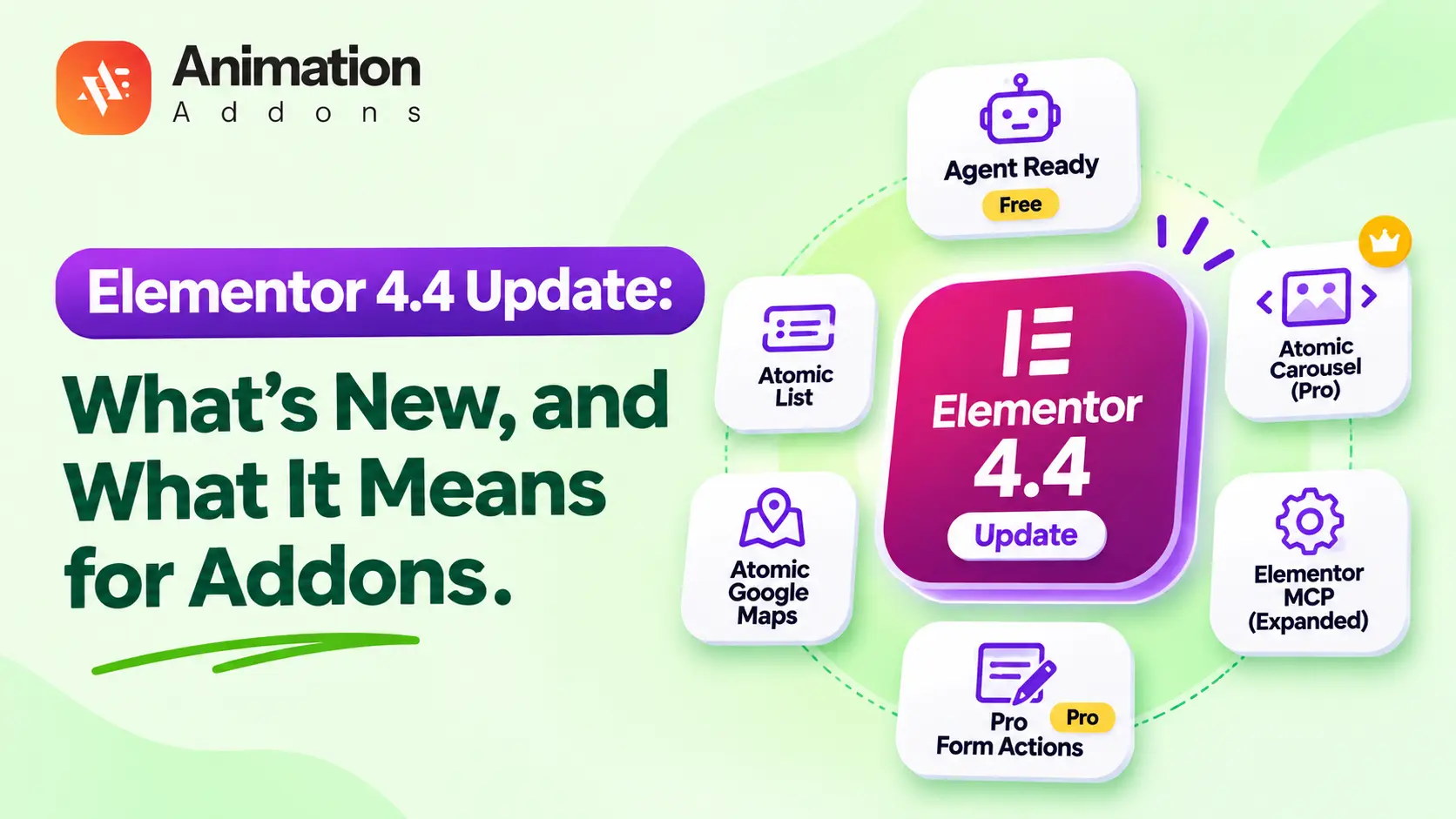
The Elementor 4.4 update, released on 9 November 2026, targets that problem. It adds a free Agent Ready toolkit, three new Atomic elements and a larger Elementor MCP. This guide explains each change, marks what is free and what needs Elementor Pro, and shows what the update means for the addons on your site.
QUICK ANSWER
The Elementor 4.4 update adds Agent Ready (a readiness score, llms.txt, Markdown pages, bot controls and read-only WebMCP tools), the Atomic List and Atomic Google Maps elements, and a Pro-only Atomic Carousel. It also expands the Elementor MCP and adds Pro form actions. Agent Ready is free and off by default.
What Is Elementor 4.4?
Elementor 4.4 is the fourth feature release of the Atomic Editor. The beta opened on 26 October 2026, Beta 2 followed on 2 November, and version 4.4.0 shipped on 9 November 2026, according to the Elementor roadmap changelog.
Most new features apply to the Atomic Editor only. Elementor confirmed that the classic editor stays unchanged for backward compatibility.
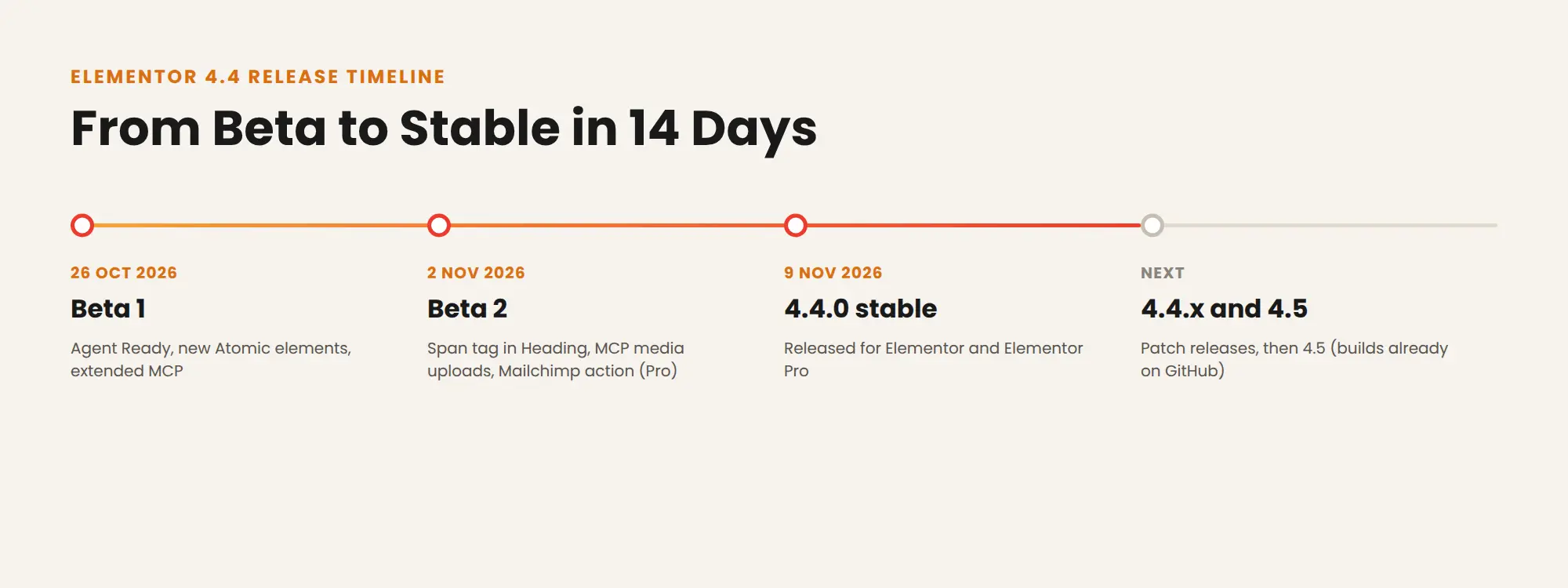
Elementor 4.4 release timeline from Beta 1 on 26th October to the 4.4.0 stable release on 9th November 2026
What’s New in the Elementor 4.4 Update
| Feature | What it does | Free or Pro |
| Agent Ready | Readiness score, llms.txt, Markdown pages, discovery files, bot access, WebMCP | Free |
| Atomic List | Lists with custom markers, SVG icons and nested items | Free |
| Atomic Google Maps | Map from an address and zoom level; API key optional | Free |
| Atomic Carousel | Any element on a slide, styled arrows and pagination | Pro |
| SVG Icon Library | Font Awesome 7 in the Atomic SVG element | Free (FA7 Pro icons and custom libraries in Pro) |
| Elementor MCP | Undo through revisions, rename layers, more legacy widgets, system info | Free (Pro widgets and form submissions in Pro) |
| Atomic Form actions | Redirect, popup, hidden fields, honeypot, score-based reCAPTCHA, Mailchimp | Pro |
| Accordion styling | Separate open and closed icons, rotation control, Selected state | Free |
| Default Styles | Included in site import and export | Free |
| Heading span tag | Span option in the Heading element (added in Beta 2) | Free |
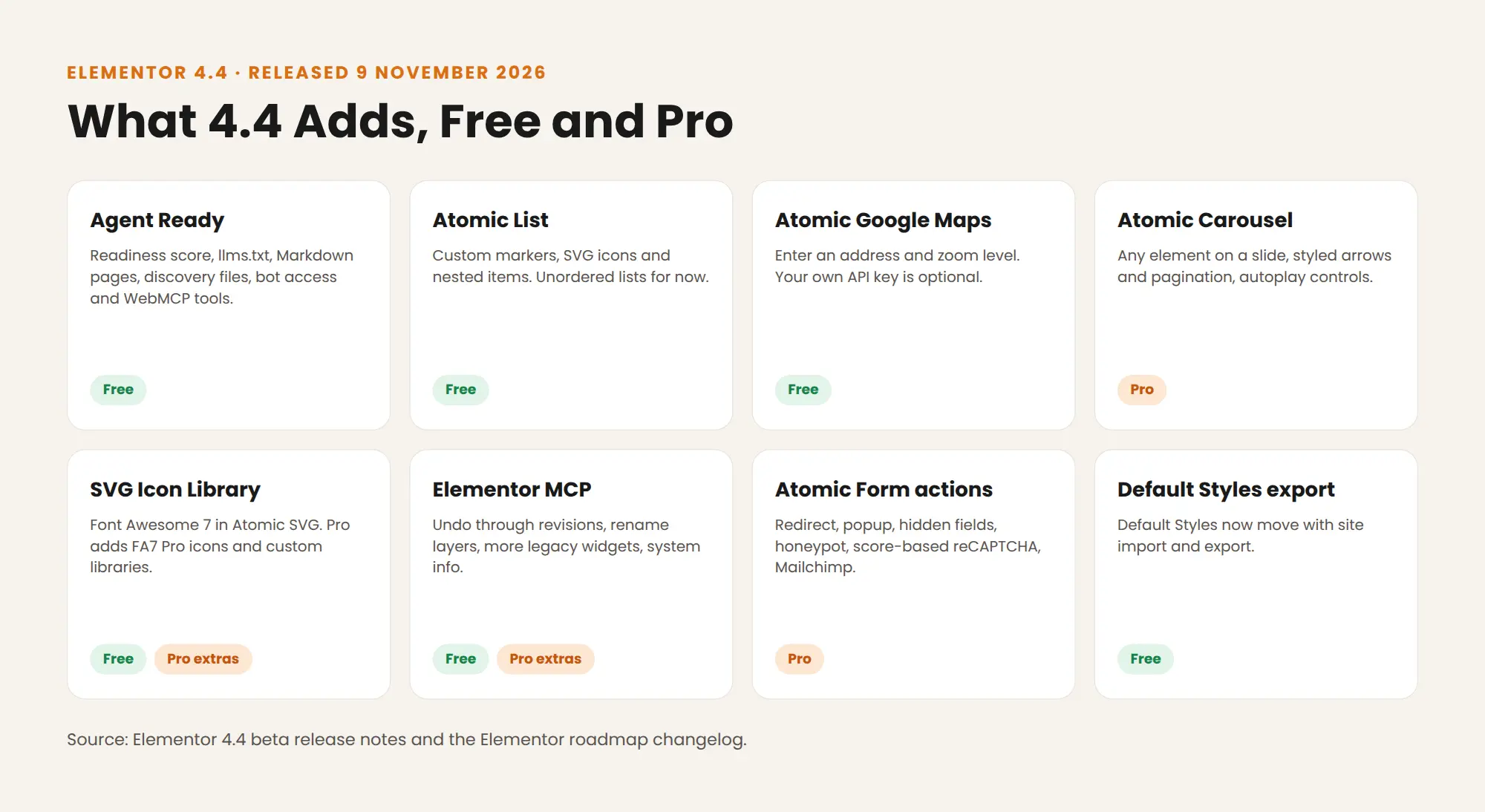
Grid of Elementor 4.4 features marked Free or Pro
Agent Ready: Prepare Your Site for AI Agents
Agent Ready is a new page under Elementor in WordPress Admin. Every feature on it is free and off by default, so nothing changes until you turn it on. Details below come from the Elementor 4.4 beta release notes.
Readiness score
The scanner grades your site in three areas: Find (can agents discover it), Read (can they understand it) and Act (can they complete tasks). Each finding links to a fix, such as a toggle, an Angie fix or a prompt you can give an MCP-compatible AI tool.
llms.txt and Markdown pages
Elementor can generate an llms.txt index at yoursite.com/llms.txt, an optional llms-full.txt with full page content, and Markdown versions of your pages without layout code or scripts. If you edit llms.txt by hand, Elementor stops updating it, and existing files are never overwritten.
Bot access
Content signals in robots.txt tell bots what they may do in three categories: Search (index for search results), Answer (fetch live content to answer questions) and Train (collect content for AI training). Bots can still ignore robots.txt.
WebMCP tools are read-only
WebMCP declares tools in your page HTML that compatible AI agents can use. Version 4.4 ships four read-only tools: Get business information, Search site content, Explore site structure and Read page content. They cannot edit pages, submit forms or complete purchases. Elementor plans to add action-based tools, starting with Atomic Forms.
What Agent Ready does not do
Elementor states that the score is a diagnostic. It does not measure AI visibility, and it does not guarantee citations, traffic or rankings. Treat these files as discovery aids next to normal SEO, not a replacement for it.
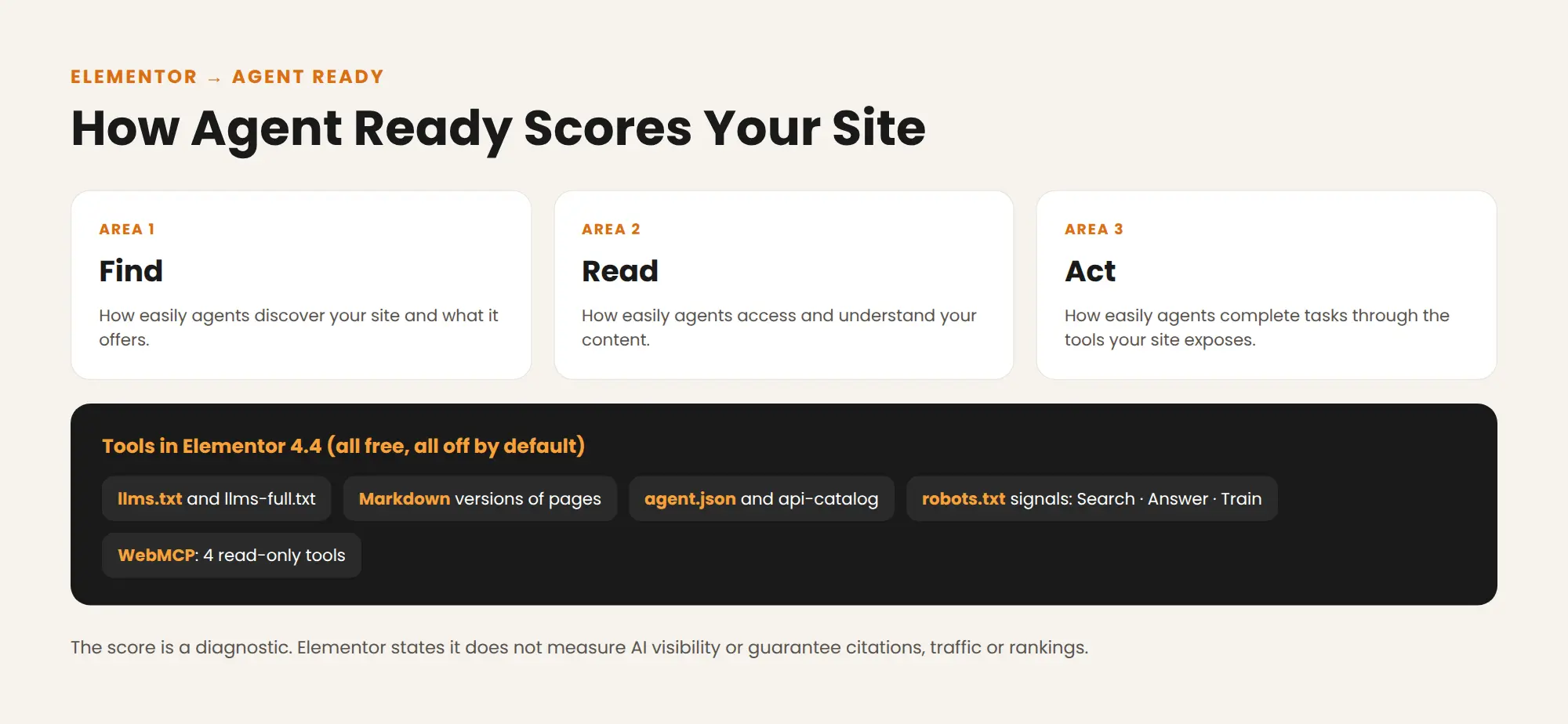
Elementor Agent Ready score areas Find, Read and Act with the tools added in version 4.4
New Atomic Elements
Explore Elementor’s latest Atomic elements, including free Atomic List and Google Maps, alongside the Pro-only Atomic Carousel. The update also brings Font Awesome 7 support and enhanced Accordion styling for more flexible, modern website designs.
Atomic List (free)
Build feature lists, pricing details or steps with bullet or SVG icon markers and multi-level nesting. It supports unordered lists only for now.
Atomic Google Maps (free)
Enter an address, set the zoom and the map is ready. Your own Google Maps API key is optional.
Atomic Carousel (Pro)
Place any element on a slide, including video. You control arrow and pagination position, style the pagination dots, and use separate Play and Pause states for autoplay. It requires Elementor Pro.
Font Awesome 7 and Accordion styling
The Atomic SVG element now includes Font Awesome 7.3.1, with search, filters and grid or list views. FA7 works in the Atomic Editor only, because its icon names differ from FA5. The Accordion gains separate open and closed icons, rotation control and Selected state styling.
Elementor MCP and Atomic Form Upgrades
AI tools connected through the Elementor MCP, such as Claude, Codex and Cursor, can now:
- Undo their own changes through revisions.
- Rename elements in the Structure panel.
- Work with a limited set of Elementor’s legacy widgets, including Counter, Progress Bar, Image Carousel and WooCommerce widgets.
- Pull system information, clear the cache and turn experiments on or off.
- View and manage form submissions (Pro).
Atomic Forms (Pro) add redirect and popup actions after submission, hidden fields, honeypot and score-based reCAPTCHA spam protection, and a Mailchimp action.
What Elementor 4.4 Means for Addons
Native elements now overlap some addon elements
Three new native elements cover jobs that addons already handle. Here is how they compare with Animation Addons:
| Need | Elementor 4.4 | Animation Addons |
| Map | Atomic Google Maps (free) | Atomic Google Maps (free) |
| Carousel | Atomic Carousel (needs Elementor Pro) | Atomic Nested Slider and Atomic Loop Grid Slider (free, work with Elementor Free; 3 slides each on the free plugin) |
| List | Atomic List (free, unordered only) | Atomic Icon List (free) |
You do not need to replace addon elements on existing pages. Both versions sit in the same Atomic panel and use the same Style tab, Classes and Variables. On new pages, pick the one whose controls fit the design. If you need a carousel without paying for Elementor Pro, the Animation Addons sliders cover it.
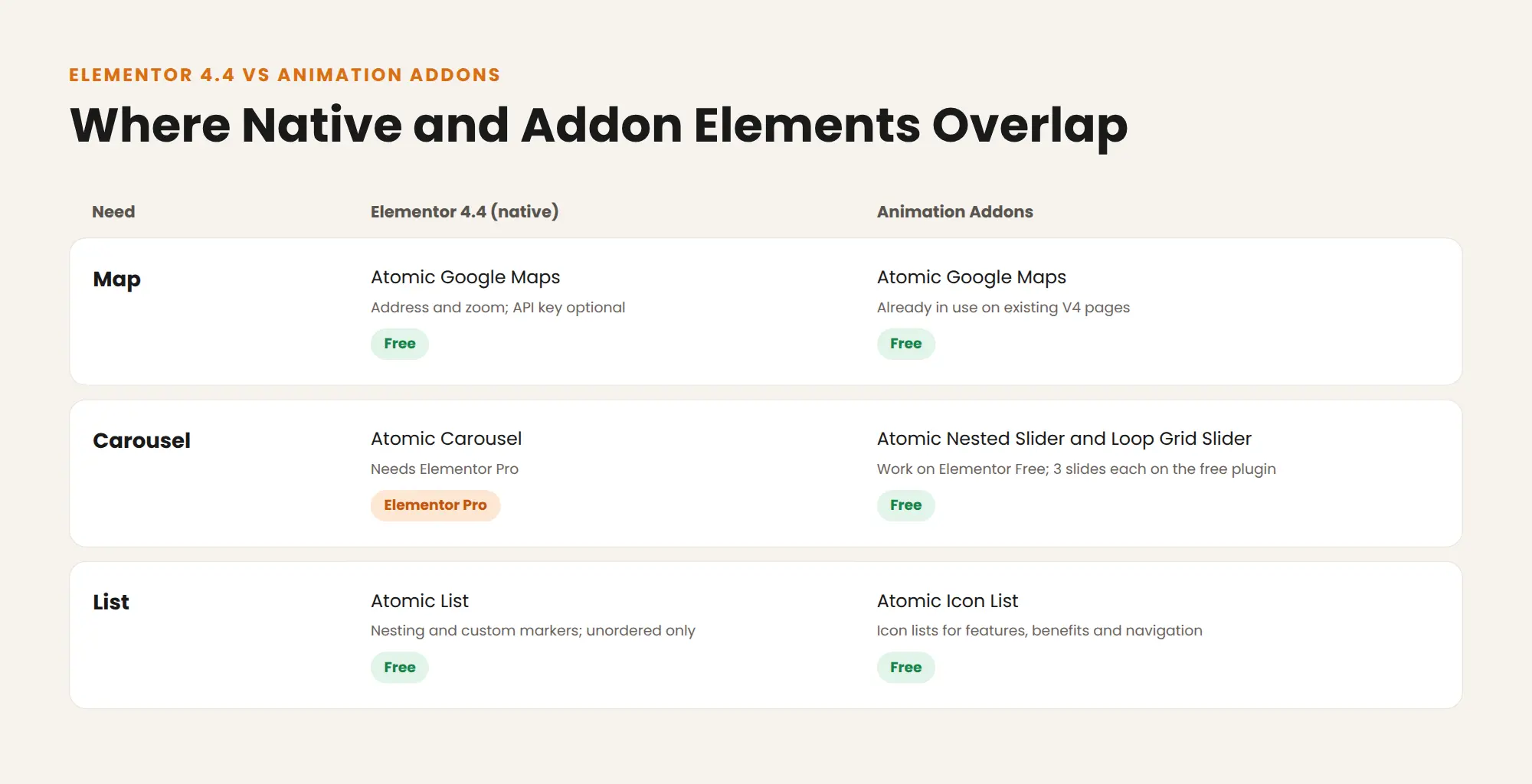
Comparison of Elementor 4.4 native elements with Animation Addons Atomic elements for maps, carousels and lists
MCP reach for third-party widgets
Elementor’s new MCP support for legacy widgets covers Elementor’s own widgets only. Third-party classic widgets are outside that list. Native Atomic elements are where Elementor says MCP support will keep growing.
Markdown output for addon elements
Agent Ready’s Markdown pages depend on each element exposing its content. Elementor’s own code adds a Markdown renderer to its elements, for example the Google Maps element. If you turn on Markdown pages, open a few Markdown versions and check that content from addon elements appears.
Animation Addons on Elementor 4.4
For everything that changed on the Animation Addons side for Elementor 4, read the Animation Addons V4 release notes. New to Atomic elements? Start with the complete guide to Elementor V4 Atomic elements and Classes and Variables explained.
How to Update to Elementor 4.4 Safely
- Back up your site, or update on a staging copy first.
- Update addons first, so each one runs its latest release. Check our Elementor V4 compatible addons guide.
- Update Elementor and Elementor Pro together, so Core and Pro stay on 4.4.
- Test key pages: forms, sliders, menus and any animated sections.
- Turn on Agent Ready features one at a time, then run a new readiness scan after each change.
For a full checklist, see 10 things to do before upgrading your live site, how to test your addon before upgrading and common Elementor V4 addon conflicts.
STAY AHEAD OF ELEMENTOR UPDATES
Get a plain-English breakdown of every Elementor release, with what is free, what needs Pro and what to test before you update.
Final Thoughts
The Elementor 4.4 update does two things. It prepares sites for AI agents with free, opt-in Agent Ready tools, and it fills gaps in the Atomic Editor with List, Google Maps and a Pro Carousel. None of it switches on by itself, so you control the rollout.
Update on staging, test your addons, then turn on Agent Ready features one by one. Where native and addon elements overlap, keep what already works and choose by controls on new pages. If you build carousels on Elementor Free, the Animation Addons sliders still cover that job without an Elementor Pro license.
FAQs
When was Elementor 4.4 released?
Elementor 4.4.0 was released on 9 November 2026. The beta opened on 26 October 2026, with Beta 2 on 2 November.
Is Elementor Agent Ready free?
Yes, every Agent Ready feature is free in Elementor Core. All features are off by default, so you turn on only what you want.
Does llms.txt improve my Google rankings?
Elementor does not claim it does. It describes llms.txt and Markdown pages as discovery aids that do not guarantee AI mentions, traffic or rankings.
Can AI agents change my site through WebMCP?
No, the four WebMCP tools in 4.4 are read-only. They can look up business details, search content, explore structure and read pages, but they cannot edit or submit anything.
Is the Atomic Carousel free?
No, the Atomic Carousel requires Elementor Pro. On Elementor Free, you can build carousels with an addon such as the Animation Addons Atomic Nested Slider.
Does the Atomic List support numbered lists?
Not yet, the Atomic List supports unordered lists only. It does support nesting and SVG icon markers.
Do I need a Google Maps API key for the Atomic Google Maps element?
No, the API key is optional. You can place a map with just an address and a zoom level.
Can I use Font Awesome 7 icons in classic widgets?
No, Font Awesome 7 works in the Atomic Editor only. Elementor kept classic widgets on the older library because FA7 icon names differ.
Will Elementor 4.4 break my addons?
Most changes are new, opt-in features in the Atomic Editor, and the classic editor is unchanged. Still, update addons first and test key pages on staging before updating a live site.
Should I replace addon elements with the new native ones?
Not on existing pages that already work. On new pages, choose by the controls you need, since native and addon Atomic elements share the same Style tab and Classes.


Leave a Reply