

Black Friday Up to 50% off every Pro plan. Annual from $24.50, Lifetime from $51.Up to 50% off ProAgency Bundle $449 $1,499 Agency Bundle$1,499 $449 Ends in Getthe deal
Classic Elementor widget · Free

Mailchimp Widget for Elementor: A free newsletter signup form, connected to your Mailchimp list

This Elementor Mailchimp widget puts an email subscription box on any page and sends every sign-up to a Mailchimp audience. Turn on name and phone fields, tag new subscribers, ask for double opt-in, and style the inputs, icons and button to match your site.

  • Mailchimp API and Audience
  • Name and phone fields
  • Tags and double opt-in
  • Ajax submit

Classic widget · Elementor 3 and 4Updated

Live demos

Ten signup form styles, live

Ten ways to style an Elementor newsletter form, each on a small site. Type an email and press the button: the form answers like the widget does. On this page nothing is sent to Mailchimp.

Sahara FilmsFilmsStoriesNewsletter
A man in a blue headscarf beside a camel, a still from a Sahara Films documentary
From the cutting room

Stories from the set, every Friday

*Note: your details are safe with us.

Film studio newsletter

Outlined bar with a paper plane

The newsletter page of a film studio. The email field and an uppercase Submit button share one thin rounded outline. A paper plane follows the word, and a short privacy note sits underneath.

Hover Submit, then send an email

In the Style tab, under Input, set Width to 75% and Border Radius to 50 px. In Form, add a paper plane Icon after the button Text. Under Button, set the Hover Color to #999999.


Northlight JournalStoriesPlacesSunday edition
The Sunday edition

One long read about a quiet place, every Sunday morning.

No news, no ads. Just a story, three photographs and a map.

A woman in white looking out at the sea
This week: the slow coast
Blog newsletter

Underlined field next to an article

A weekly article page of a travel journal. A thin white line sits under the email field and a second one under Submit and its arrow, so the form reads as part of the text.

Type an email and press Submit

Under Input, set a bottom Border of 1 px. In Form, set Item Gap to 0 and give the button an arrow Icon after the Text. Under Button, set a bottom Border of 1 px.

Medica ClinicServicesDoctorsJournal

Health notes from our doctors

Seasonal advice and clinic news, twice a month.

Medica Clinic12 Harbour RoadOpen Mon to Sat, 8 to 18
Book a visitGeneral practiceDental carePhysiotherapy
PatientsPricesInsuranceContact
Clinic health notes

Square field and a solid button

The journal page of a medical clinic. A square outlined field sits beside a solid orange Subscribe button that turns white on hover, in a band above the clinic details.

Hover Subscribe, then send an email

In Form, set Item Gap to 10 px. Under Input, set Width to 71%. Under Button, set the Normal Background to #F6502C and the Hover Background to white.

Shally DevDocsAPIChangelog

v2.4October 2026

  • NewWebhooks for order events
  • FixFaster image uploads on slow networks
  • NewDark mode for the dashboard

Get release notes by email

We send a confirmation link first.

Release notes signup

Gradient frame with an envelope icon

The changelog of a developer tool. The field sits in a rainbow frame with one cut corner, with an envelope before it and a send button without text. Double opt-in is on, so the form asks you to confirm by email.

Send an email to see the confirmation

In MailChimp, turn on Enable Double Opt In?. In Form, add an envelope Icon before the email field, empty the button Text and add a paper plane Icon. Under Button, set the Hover Color to #6BE3AA.

MalepèreWinesVisitWine club
The Malepère website on a tablet and a phone
Wine club

First pour of every vintage, for members

Tasting notes, cellar dates and two bottles set aside for you.

Wine club signup

Large lowercase field and a long arrow

The wine club page of a winery. A large lowercase placeholder sits over one white line, and a long thin arrow is the button. It stays quiet beside the picture.

Type an email and press the arrow

Under Input, set Width to 92% and the Placeholder Font Size to 24 px. In Form, give the button a long arrow Icon and leave the Text empty. Under Button, set Icon Size to 47 px.

RosterFeaturesPricingEarly access
A team planning the week together around a long table
Launching in spring

Team schedules, without the group chat

1,180 teams are on the list.

App waitlist

Dark pill with a round send button

The early access page of a scheduling app. A dark pill holds a muted envelope and the email field. A separate round button holds a paper plane that turns lime on hover.

Hover the round button

In Form, add an envelope Icon before the email field. Under Input, set Border Radius to 0 37 37 0 px. Under Button, set Border Radius to 100 px and the Hover Color to #BAE900.

Maison FormeProjectsStudioLetters
A calm room with a round arched niche and a low sofa
Studio letters

A room we finished, and why it works

Four letters a year, with plans and the materials list.

Studio newsletter

Fine line field and an oval button

The letters page of an interior studio. A fine line holds the email address, and an oval outlined Submit button sits below it and fills with sand on hover.

Hover the oval Submit button

Under Input, set Width to 100%. Under Button, set Border Radius to 50% and Margin to 30 px on top, then set the Hover Background to #E8BF96.

Sparkle HomeServicesPricesTips
A bright living room with a woven chair and white sofa

One cleaning tip a month

Short, seasonal and tested by our team in real homes.

Cleaning service tips

Teal block with a paper plane

The tips page of a home cleaning service. The email field and a paper plane form one teal block with rounded corners. The plane turns lime on hover.

Hover the plane, then send an email

Under Input, set Width to 85%, Background to #024748 and Border Radius to 15 0 0 15 px. Under Button, set the Hover Color to #C9F31D.

ShallyShopLookbookJournal
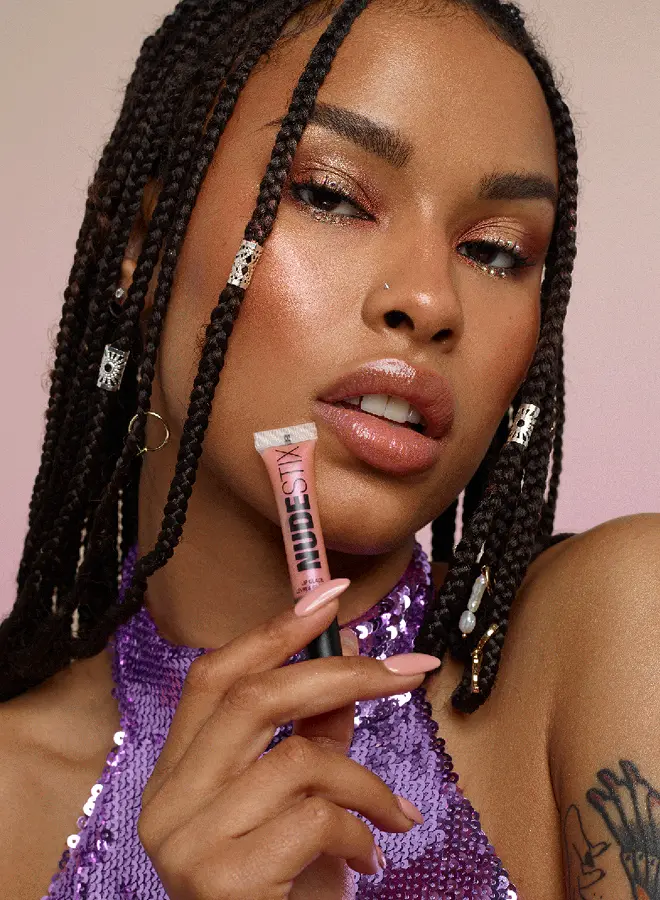
A woman with braids applying lip gloss
The Shally journal

Beauty notes, straight from the studio

  1. Three glosses for autumn light
  2. How we shoot a lookbook in one day
Fashion journal

Dark pill with a peach button

The journal page of a fashion label. A near-black pill holds the field, with a grey placeholder, and a round peach button holds a paper plane.

Type an email and press the peach button

In Form, set Item Gap to 20 px. Under Input, set Border Radius to 100 px. Under Button, set Background to #FFB794 and Border Radius to 100 px.

HaldenProductCustomersUpdates
Product updates

What we shipped this month, in five minutes

The Halden team reviewing a release on two screens
Product updates

Navy pill with a white button

The updates page of a software company. A navy pill holds the email field, and a white Subscribe button sits inside its right end.

Type an email and press Subscribe

Under Input, set Width to 61.5% and Border Radius to 100 px. Under Button, set Width to 38.5% and Background to white.

Features

Key features of the Mailchimp widget

What the free widget does, each point tied to a setting in the Elementor panel.

Elementor Mailchimp integration

Paste your MailChimp API key, or save it once in the Animation Addons dashboard, then choose the Audience that receives new subscribers.

Elementor Mailchimp tags

Add one or more comma-separated Tags, such as "footer" or "webinar", to segment your list or start a Mailchimp automation.

Single or double opt-in

Turn on Enable Double Opt In? and Mailchimp emails a confirmation link first. The form then shows your Confirmation Message.

Name and phone fields

Switch on Enable Name? for First Name and Last Name, or Enable Phone? for a phone field. They fill FNAME, LNAME and PHONE.

Field icons

Each field takes an Icon with an Icon Position before or after. The Input Icon style section sets its color, size and box.

Button text and icon

Write the button Text, pick an Icon, set its Icon Position and Icon Spacing, or leave the text empty for an icon button.

One line or stacked

Use Alignment, Item Gap and the input Width, which can differ per device, to keep field and button on one line or stack them. That makes an Elementor email subscription form for a footer or a full page.

Ajax submit and clear messages

Sign-ups go through without a page reload. The Success Message or an error, such as an invalid email, shows above the form, and a repeat sign-up updates the contact.

Step by step

How to add Mailchimp to Elementor

Five steps with the free plugin. The bold names are the labels in the Elementor panel.

  1. Install Animation Addons for Elementor, then turn on Mailchimp in Animation Addons → Elements.

  2. Optional: save your Mailchimp API key once in the widget settings in the Animation Addons dashboard, so every new form uses it.

  3. In Elementor, drag the Mailchimp widget onto the page, check the MailChimp API key, choose the Audience and add any Tags.

  4. In Form, set the Email Label and Placeholder, turn on Enable Name? or Enable Phone? if you need them, and write the button Text.

  5. Style Input, Input Icon and Button in the Style tab, edit the Success Message, then send a test sign-up.

Try Animation Addons Free on WordPress.org · Works with Elementor Free
FAQ

Questions about the Mailchimp widget

How do I add an Elementor Mailchimp form?

Turn on the Mailchimp widget in Animation Addons, drag it onto the page, paste your Mailchimp API key and choose an Audience. Every sign-up from that form joins the audience, with no extra plugin or code.

Is the Mailchimp widget free?

Yes. For Elementor Mailchimp free of charge, install the Animation Addons plugin from WordPress.org. Advanced Mailchimp, with custom fields, is the Pro version.

Can I use Elementor Mailchimp without Pro?

Yes. The widget works with the free Elementor plugin and does not use the Elementor Pro form builder, so no Pro license is needed.

Can an Elementor newsletter form ask for a name?

Turn on Enable Name? for First Name and Last Name fields, or Enable Phone? for a phone field. They are saved in the FNAME, LNAME and PHONE merge fields.

How does Elementor Mailchimp double opt in work?

Turn on Enable Double Opt In? and the contact is added as pending. Mailchimp emails a confirmation link, and the form shows your Confirmation Message instead of the Success Message.

Can I add Elementor Mailchimp tags to subscribers?

Yes. Type one or more tags in Tags, separated by commas. Each new or updated subscriber gets those tags in Mailchimp.

What if someone subscribes twice?

The widget adds or updates the contact, so a second sign-up with the same email updates the existing subscriber instead of failing.

How do I style the Elementor subscribe form?

Use the Style tab. Label, Input, Input Icon and Button each have colors, typography, borders and radius, and the button has Normal and Hover states. Item Gap and Width set the layout.

When should I use Advanced Mailchimp instead?

When you need more than email, name and phone: dropdowns, radio toggles or any custom merge field, for example to let subscribers pick their interests.

Animation Addons Pro · Elementor 4

Start your list for free

A Mailchimp signup form with tags and double opt-in, styled in Elementor.

Black Friday dealup to 50% off every Pro planEnds 5 Dec

  • 15-day money-back guarantee
  • Rated 4.6 / 5 on WordPress.org
  • No Elementor Pro needed
  • Elementor 3 & 4 in one license