Halloween 40% off every Pro plan. Lifetime from $51, pay once.40% off Pro Vanishes in Claim40% off
Classic Elementor widget · Pro

Advanced Portfolio for Elementor: An animated Elementor portfolio with nine skins

Show your work the way an award site would with an Elementor portfolio widget: stacked cards that fly away, images split into sliding columns, projects that flip up as you scroll, sliders with thumbnail rails and a cursor that says View. Pick a skin, point it at your posts or projects, and style it in Elementor.

  • 9 animated skins
  • Slider and grid layouts
  • Cursor hover effect
  • Any post type

Classic widget · Elementor 3 and 4 · ProUpdated

Live demos

Nine portfolio skins, live

Nine Elementor portfolio layouts on small sites for studios, architects, a film company and a software team. Click, hover and scroll inside each frame. Skins that pin on a real page scroll inside their frame here.

Arolax®WorkStudioContact
The Malepère wine brand on a tablet and a phoneThe Halden website on a tabletA curved oak staircase in the Casa Lumen houseA man in a blue head wrap, a still from Sahara StoriesThe Orbit phone mockup on dark pebbles

Malepère Wines

Sep 12, 2026

Halden Platform

Aug 28, 2026

Casa Lumen

Jul 09, 2026

Sahara Stories

Jun 02, 2026

Orbit Phone

May 25, 2026
Agency case studies

Case study cards in a stack

Five project cards stacked like a deck. Next sends the top card away to the left and the next one settles in, while the project title on the right rolls to match.

Press Next or Prev

Choose Skin Two in Skin, set Effect to Cards and Animation Speed to 1000, and turn on Navigation and Pagination Buttons.

Arolax®WorkStudioContact

Malepère Wines

The Malepère wine brand on a tablet and a phone

Halden Platform

The Halden website on a tablet

Casa Lumen

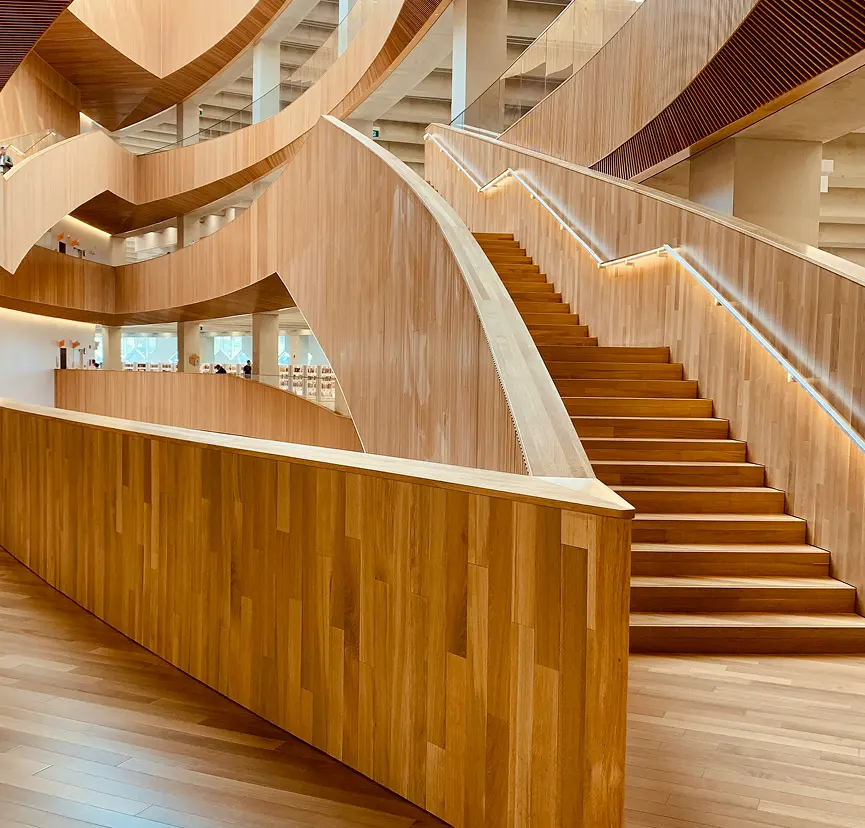
A curved oak staircase in the Casa Lumen house

Sahara Stories

A man in a blue head wrap, a still from Sahara Stories

Orbit Phone

The Orbit phone mockup on dark pebbles

Oakroom Hotel

The Oakroom hotel lobby with wooden walls
Studio home page

Projects with a thumbnail rail

One large project fades into the next. A rail of thumbnails on the right lets visitors jump to any project.

Scroll the thumbnail rail

Choose Skin Seven in Skin, set Effect to Fade and turn on Loop and Mousewheel Button.

Casa StudioProjectsOfficeContact
A curved oak staircase in the Casa Lumen house
Architecture

Casa Lumen

A curved oak staircase in the Casa Lumen house
Architecture

Casa Lumen

A curved oak staircase in the Casa Lumen house
Architecture

Casa Lumen

01 / 05
Architecture studio

Projects in sliding columns

A full-width photo of a house, cut into three columns. On the next project the columns slide in turns, one up and one down.

Press the arrows or wait

Choose Skin Eight in Skin. Turn on Enable Button under Cursor Hover Effect and write View Work in Text.

NorthlightFilmsWorkAbout

Work

View all our work.

105

The Malepère wine brand on a tablet and a phone

Malepère Wines

Sep 12, 2026
The Halden website on a tablet

Halden Platform

Aug 28, 2026
A curved oak staircase in the Casa Lumen house

Casa Lumen

Jul 09, 2026
A man in a blue head wrap, a still from Sahara Stories

Sahara Stories

Jun 02, 2026
The Orbit phone mockup on dark pebbles

Orbit Phone

May 25, 2026
Film work list

Film list with a counter

A header stays in place with a large counter that ticks from 1 to 5 as the film posters scroll past. Hover a poster for its name and date.

Scroll inside the frame

Choose Skin Nine in Skin and set Posts Per Page to 5.

HaldenProductCasesPricing
The Malepère wine brand on a tablet and a phone

Malepère Wines

Sep 12, 2026
The Halden website on a tablet

Halden Platform

Aug 28, 2026
A curved oak staircase in the Casa Lumen house

Casa Lumen

Jul 09, 2026
A man in a blue head wrap, a still from Sahara Stories

Sahara Stories

Jun 02, 2026
The Orbit phone mockup on dark pebbles

Orbit Phone

May 25, 2026
The Oakroom hotel lobby with wooden walls

Oakroom Hotel

Apr 14, 2026
Product case studies

Case studies in a grid

A clean three-column grid with thin lines. Scroll the page quickly and the images lean with your speed, then settle. Hover one for its name and date.

Scroll the page fast

Choose Skin Four in Skin, set Posts Per Page to 6 and Post Title Tag to H3.

Arolax®WorkStudioContact
The Orbit phone mockup on dark pebbles

Orbit Phone

May 25, 2026
A curved oak staircase in the Casa Lumen house

Casa Lumen

Jul 09, 2026
A model in a red pleated outfit for Shally

Shally Autumn

Mar 03, 2026
The Malepère wine brand on a tablet and a phone

Malepère Wines

Sep 12, 2026
A man in a blue head wrap, a still from Sahara Stories

Sahara Stories

Jun 02, 2026
The Halden website on a tablet

Halden Platform

Aug 28, 2026
Project carousel

Project cards in a carousel

Tall project cards, three at a time, sliding every three seconds in a loop. The arrow beside each title turns upright on hover.

Hover to pause

Choose Skin One in Skin, set Slides to Show to 3 and Space Between to 70, and turn on Autoplay and Loop.

Maison FormeProjectsJournalStudio
The Malepère wine brand on a tablet and a phone

Malepère Wines

Sep 12, 2026
A curved oak staircase in the Casa Lumen house

Casa Lumen

Jul 09, 2026
The Oakroom hotel lobby with wooden walls

Oakroom Hotel

Apr 14, 2026
Interior design studio

Room projects in a tilt mosaic

Two half-width projects and one full-width project. Each leans toward the mouse, and a View Work circle follows it.

Move the mouse over a project

Choose Skin Five in Skin, turn on Enable Button under Cursor Hover Effect and write View Work in Text.

Arolax®WorkStudioContact
A man in a blue head wrap, a still from Sahara Stories

Sahara Stories

Jun 02, 2026
The Malepère wine brand on a tablet and a phone

Malepère Wines

Sep 12, 2026
The Orbit phone mockup on dark pebbles

Orbit Phone

May 25, 2026
A curved oak staircase in the Casa Lumen house

Casa Lumen

Jul 09, 2026
A model in a red pleated outfit for Shally

Shally Autumn

Mar 03, 2026
The Oakroom hotel lobby with wooden walls

Oakroom Hotel

Apr 14, 2026
Portfolio intro

Projects that flip up on scroll

A giant PORTFOLIO title grows to three times its size and shrinks back, while each project flips up from flat as it scrolls into view.

Scroll inside the frame

Choose Skin Three in Skin and set Posts Per Page to 6.

Sahara FilmsFilmsPressAbout
A man in a blue head wrap, a still from Sahara Stories
A curved oak staircase in the Casa Lumen house
The Malepère wine brand on a tablet and a phone
The Oakroom hotel lobby with wooden walls
The Halden website on a tablet
A model in a red pleated outfit for Shally
Film company

Full-screen photo with project names

Project names stacked in the centre over a full-bleed photo. Choose a name and the photo fades to that project, then slowly zooms while you hover.

Click a project name

Choose Skin Six in Skin, set Effect to Fade and Direction to Vertical, and turn on Loop.

Features

Features of the Advanced Portfolio widget

Each feature comes with the panel settings behind it.

Pre-designed skins

Pick one of nine layouts in Skin and the motion comes with it. Change skin any time, your projects stay. These are the Elementor portfolio layouts of the widget.

Layout and display

Set Posts Per Page, the Image Resolution and the Post Title Tag, so the Elementor portfolio grid loads fast and keeps a clean heading outline.

Cursor hover effect

Turn on Enable Button under Cursor Hover Effect and a circle with your own text, such as View, follows the mouse over each project. It is an Elementor portfolio custom cursor.

Slider controls

For slider skins: Slides to Show, Autoplay, Allow Touch Move, Loop, Animation Speed and Space Between. Together they make an Elementor portfolio slider.

Navigation and direction

Show or hide the arrows and dots with Navigation and Pagination Buttons, switch on Mousewheel Button, and set the Direction to horizontal or vertical.

Transition effects

Choose an Effect such as slide, fade or cards for the slider skins. This gives an Elementor portfolio carousel its motion.

Query options

Choose the Source post type for an Elementor portfolio custom post type, then filter with Include By, Post Format, Date, Order By and Order.

Style every part

Layout, slider navigation, pagination, content, date, title and image styles, each responsive, plus the cursor circle's width, height, colours and border. Skin Three and Nine add an Elementor portfolio scroll animation.

Step by step

How to add a portfolio in Elementor

Five steps. The bold names are the labels in the Elementor panel.

  1. Install Animation Addons Pro, then turn on Advanced Portfolio in Animation Addons → Elements.

  2. In Elementor, search the panel for Advanced Portfolio and drag it onto the page. That is how to create a portfolio in Elementor with this widget.

  3. Choose a Skin, then set Posts Per Page, the Image Resolution and the Post Title Tag.

  4. In Query, pick the Source with your projects and the order. For slider skins, set the options in Slider.

  5. Turn on Enable Button under Cursor Hover Effect if you like, style the titles and images, check the page on mobile and publish.

Get Animation Addons Pro Part of Animation Addons Pro · Works with Elementor Free
FAQ

Questions about Advanced Portfolio

How do I create a portfolio in Elementor?

Add the Advanced Portfolio widget from Animation Addons Pro, choose one of its nine skins in Skin and point Query at your projects. The skin brings its own animation, so there is nothing to code.

Which portfolio layouts does it include?

Nine skins: a card stack, a fading slider with a thumbnail rail, a split-image slider, a list with a pinned counter, a grid that skews on scroll, a three-up carousel, a tilt mosaic, projects that flip up on scroll, and full-screen project titles.

Can I make an Elementor portfolio grid?

Yes. Skin Four shows an Elementor portfolio grid of three columns, and the images lean with your scroll speed. Skin Five is a two-column mosaic that tilts toward the mouse.

Can I turn the portfolio into a slider?

Yes. Four skins are sliders. Set Slides to Show, Autoplay, Loop, Mousewheel Button, Animation Speed, Space Between, the Effect and the Direction, and show or hide the arrows and dots. The result is an Elementor portfolio slider or carousel.

Can it show a custom portfolio post type?

Yes. In Query, set Source to any post type, such as posts, pages or a projects type, and filter by terms, author, format or date. That makes it an Elementor portfolio custom post type widget.

What is the cursor hover effect?

When Enable Button is on, a circle with your text, such as View or View Work, follows the mouse over each project. You set its text, size, colours, border and radius. It works as an Elementor portfolio hover effect and custom cursor.

Do I need Elementor Pro?

No. Advanced Portfolio works with Elementor Free, so you can build an Elementor portfolio without Elementor Pro. It is part of Animation Addons Pro, not Elementor Pro.

Is it different from the Portfolio widget?

Yes. The Portfolio widget shows projects in a grid, card or masonry layout with a filter bar and Load More. Advanced Portfolio adds nine animated skins, sliders with effects, scroll animations and the cursor hover effect.

Which skins have scroll animations?

Skin Three flips each project up as you scroll while the title grows and shrinks. Skin Nine pins a header with a counter. Skin Four skews the images with scroll speed.

Does it work in Elementor 4?

Yes. It is a classic widget, so Elementor 4 lists it with the legacy widgets. For pages built in the new editor there is also the atomic Advanced Portfolio.

Animation Addons Pro · Elementor 4

Your best work, in motion

Nine animated portfolio skins for Elementor, with sliders, scroll effects and a cursor hover.

Halloween deal40% off every Pro planEnds 5 Nov

  • 15-day money-back guarantee
  • Rated 4.6 / 5 on WordPress.org
  • No Elementor Pro needed
  • Elementor 3 & 4 in one license