

Black Friday Up to 50% off every Pro plan. Annual from $24.50, Lifetime from $51.Up to 50% off ProAgency Bundle $449 $1,499 Agency Bundle$1,499 $449 Ends in Getthe deal
Classic Elementor widget · Free
Services Tabs for Elementor: A tabbed services section with an image for every service

Services Tabs is the services tabs widget for Elementor. It turns your services list into a tabbed services section. Each tab has a number, a title, text, an image and a link. A visitor clicks a service and its image and details fade in, so one section shows every offer without a long scroll.

  • Two layout styles
  • Image per service
  • Button with hover styles
  • Breakpoint for small screens

Classic widget · Elementor 3 and 4Updated

Live demos

Four services sections, live

Four services sections, each on a small site. Click or tap a service to switch. The tabs also answer the arrow keys.

Maison FormeProjectsServicesJournal
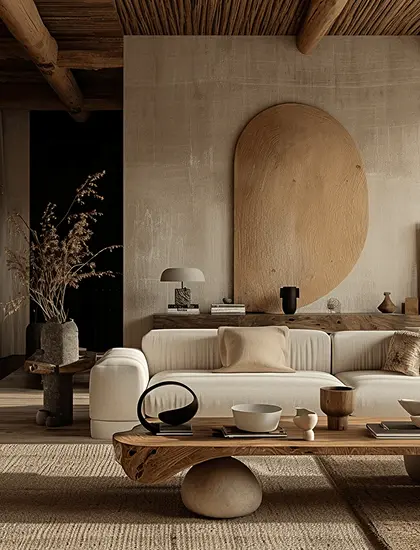
A bright lounge with wood slat walls and soft chairs

We shape each room around how you live: layout, materials, colour and light, planned as one calm whole.
Studio services

An Elementor tabbed services section

The services page of an interior studio. Five numbered titles in capitals, grey until you point at them. The open service shows a short text, a Know more button and a tall photo in the bottom right corner. The section fades up as it loads.

Click a service

In the panel, set Style to One, then set Hover Style in Button to Rollover Top and Tabs Width in the Style tab to 42%. The fade up on load is the Animation tab of Animation Addons Pro.

Shally LivingRoomsShopStories
Room ideas

Rooms we styled this season

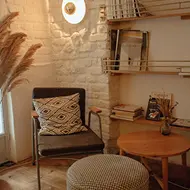
A living room with a low white sofa and a wooden table
Room ideas

Elementor tabs with a short text under each title

The rooms page of a home shop. Two bold titles, each with a line of text under it and a thin line on the left that turns white on the open tab. The photo changes on the right. The section fades up as it loads.

Click a room

In the panel, set Style to Two. In the Style tab, under Tab Title, add a left Border and set the Border Color of Hover/Active to white.

Halden WorkProductTeamsPricing
Why teams switch

Work stays clear when it lives in one place

Product design weekly

Recording 26:32

Share link
Three colleagues talking in a video meeting

Messages

AnnaNotes are in the doc.
JessicaCan we move the review?
LenaFriday works for me.
Product features

Elementor tabs with numbers beside an app screen

The product page of a work software company. Three numbered reasons to switch, each with a line of text, beside a screen of the product that changes with the tab.

Click a reason

In the panel, set Style to Two, fill the Number of each item in Tabs Items, and set Breakpoint to Tablet Portrait. Set Tabs Width to 40% in the Style tab.

Northlight StudioWorkSessionsContact
Book a session

Photography for people and brands

A woman by the sea, seen from behind, in soft daylight

One hour in the studio or outdoors, with light set for you and a gallery of edited photos within a week.

Photo services

Services stacked with a photo under each title

The sessions page of a photo studio on a narrow screen. Each title sits above its own photo, text and a View More button, and a click opens one at a time.

Click a title

Below the width you pick in Breakpoint, the tabs stack like this. Each item uses its own Choose Image, Content and Link, and the button Text is View More.

Features

Key features of Services Tabs

What the widget gives you, each tied to a setting in the Elementor panel.

Two layouts

Pick Style One for Elementor vertical tabs: a list of titles with the text and button in the panel. Or pick Two for text under each title.

Image tabs for each service

These Elementor image tabs give each item a Choose Image. Image Resolution sets the file size, so every tab shows its own photo.

Numbers and titles

Give each tab a Number and a Title for Elementor tabs with numbers, and style both with colour, typography and Space.

A button per service

For Elementor tabs with a button, use Style One. The Button section adds a call to action with 7 styles and 7 hover styles.

A link per service

The Link of each item goes on its image and on its button.

Hover and active states

Set the title colour and border colour for Normal and Hover/Active.

Elementor tabs on mobile

Use Breakpoint to choose the screen width below which the tabs stack, one title above its own content.

Space and styling for every part

Set Tabs Width to split the space between the tab list and the image, then style the Image (border, shadow, margin), the Tab Title (border, padding, margin) and the Content text, so your services section matches the rest of the page.

Step by step

How to make tabs in Elementor

Five steps. The bold names are the labels in the Elementor panel.

  1. Install the free Animation Addons plugin, then turn on Services Tabs in Animation Addons → Elements.

  2. In Elementor, search the panel for Services Tabs and drag it into your Elementor services section.

  3. In Tabs, pick a Style, then fill each item in Tabs Items: Number, Title, Content, Choose Image and Link.

  4. For Style One, set the button Text, Style and Hover Style in Button. In Settings, choose the Breakpoint.

  5. In the Style tab, set Tabs Width and the Tab Title colours, then click the tabs in preview to check the switch.

Try Animation Addons Free on WordPress.org · Works with Elementor Free
FAQ

Questions about Services Tabs

How do I make an Elementor service tabs section?

Add the Services Tabs widget, pick Style One or Two, and fill one item per service with a number, title, text, image and link. No code is needed.

What is the difference between Style One and Two?

Style One is a numbered list of titles; the active service shows its text, a button and an image. Style Two puts the text under each title and shows only the image in the panel.

Can I use Elementor tabs with images?

Yes, each service tab can have its own image. Every item has its own image and link. The link goes on the image, and in Style One also on the button.

Is there an Elementor tabs fade effect?

Yes. The tabs switch on click or tap, and the chosen panel fades in. Hover only changes the title colour you set under Hover/Active.

How do Elementor tabs on mobile work here?

Below the width you pick in Breakpoint, the side-by-side layout stops and the tabs stack, with each image below its title.

Is this a free Elementor tabs addon?

Yes. Services Tabs is part of the free Animation Addons plugin on WordPress.org. Entrance animations from the Animation tab, as in two demos here, need Animation Addons Pro.

Services Tabs or Tabs Widget: which one?

Use Services Tabs for a services list with a photo per service. Use the Tabs Widget for general tabbed content with icons or saved Elementor templates.

Does Services Tabs work in Elementor 4?

Yes. It is a classic widget, so Elementor 4 lists it with the legacy widgets.

Animation Addons Pro · Elementor 4

Every service, one clean section

Numbered service tabs with an image, text and button each, built and styled in Elementor.

Black Friday dealup to 50% off every Pro planEnds 5 Dec

  • 15-day money-back guarantee
  • Rated 4.6 / 5 on WordPress.org
  • No Elementor Pro needed
  • Elementor 3 & 4 in one license