Halloween 40% off every Pro plan. Lifetime from $51, pay once.40% off Pro Vanishes in Claim40% off
Classic Elementor widget · Free

Image Box Slider for Elementor: An image carousel where every slide has a title, text and a link

The Image Box Slider is an Elementor image box slider and image carousel in one. Each slide pairs a photo with a title, a sub title, a short description and a link. Pick one of five styles and a slide, fade, coverflow, flip or cube effect, then let it autoplay, loop or follow the mousewheel. Free, on Elementor Free.

  • Five box styles
  • Slide, fade, coverflow, flip, cube
  • Autoplay, loop and mousewheel
  • Image hover effects

Classic widget · Elementor 3 and 4Updated

Live demos

Seven image box sliders, live

Seven ways to use an Elementor image carousel with text, each on a small site. Hover a slide, drag a slider or use the arrows. The entrance animations on three of them use the Animation tab of Animation Addons Pro.

Portfolio carousel

Project slider with four photos in view

The projects page of an interior studio. Four tall photos are in view, each with a grey project type above its name. A new slide comes every 3 seconds, and each photo zooms in on hover.

Hover a photo or drag

In the panel, set Style to Style One, Slides to Show to 4, Animation Speed to 1200 and Hover Effect to Zoom In.

Halden RepairRepairsPricesBook
Our services

Fixed in a day, done right

Service grid

Service cards with a button

The repairs page of a phone and laptop shop. Dark cards with a photo, a centred service name and a Read More button. The row turns in from a slight tilt as it scrolls into view (Animation tab, Pro).

Watch it turn in, then hover

In the panel, set Style to Style One, Link Type to Button, Animation Speed to 800 and Alignment to Center.

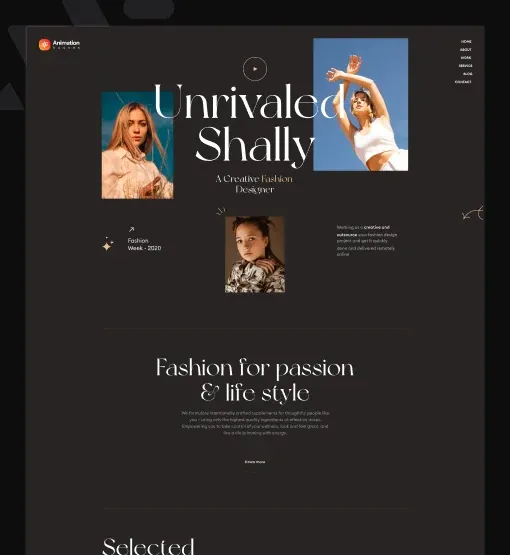
ShallyNew inCollectionsStories
Collections

Five looks for the season

A model in a red pleated paper collar and round glasses
[01]

Paper collars and soft pleats

A woman in a pink dress turning on a balcony
[02]

Summer dresses that move with you

A woman with braids holding a lip gloss wand
[03]

The glow edit for late nights

A woman in a cream shirt in tall grass at sunset
[04]

Linen for long field days

A woman in white looking out over the sea
[05]

White cotton by the coast

Fashion collections

Collection slider with number tags

The collections page of a fashion label. Each slide has a number tag beside its title. The slider rises in as it scrolls into view (Animation tab, Pro) and moves on a sideways swipe or trackpad scroll.

Swipe sideways on a trackpad

In the panel, set Style to Style One, Slides to Show to 3, Mousewheel to Show and Animation Speed to 500.

Sahara FilmsFilmsServicesContact
Production services

Everything the shoot needs

A man in a blue head wrap beside a camel
Location scouting

Desert shoots

Dunes, camps and guides in the Sahara, with permits ready before the crew lands.
A woman in white looking out over the sea
Second unit

Coastal days

Small crews for beaches and cliffs, timed to the tide and the golden hour.
A bright bedroom with a wooden bench
Production design

Interior sets

Rooms dressed for the story, from a single bed to a whole hotel floor.
A hotel lobby with wooden walls and low chairs
Location booking

Hotel locations

Lobbies, bars and suites booked by the hour, with quiet times for sound.
A living room with a yellow sofa and a floating stair
Location booking

House rentals

Family homes with light, space and owners who are used to film crews.
Services list

Photo and text side by side

The services page of a film production company. Each slide has a photo on the left and the text on the right in a thin outlined box. Two slides are in view. Round arrows move the slider, and the photo drifts sideways on hover.

Use the arrows

In the panel, set Style to Style Two, Slides to Show to 2, Navigation to Show and Hover Effect to Left Move.

Arolax®WorkServicesStudio
What we do

Six ways we help brands grow

A woman with braids holding a lip gloss wand
Brand content

Campaigns

Shoots and edits for launches, with one look across every channel.
A tablet and a phone showing a winery website
Brand systems

Identity

Logo, type and colour rules, built to work on paper and on screen.
A phone on dark pebbles showing a mockup screen
Digital design

Product

Apps and dashboards tested with real users before a line of code.
A team around a meeting table
Strategy

Workshops

Two-day sessions that turn a long brief into a short, clear plan.
A woman in a pink dress turning on a balcony
Film and animation

Motion

Short films, titles and loops that give a brand its rhythm.
A calm living room with a round wooden panel
Retail and events

Spaces

Pop-up shops and stands that feel like the brand in three dimensions.
Agency services

Text over the photo, revealed on hover

The services page of a brand agency. The text sits on the photo. On hover the sub title lifts away, the title rises, and the description and a Discover link slide up.

Hover a slide

In the panel, set Style to Style Three, Link Type to Button, Hover Effect to Zoom In and Autoplay to Yes.

Travel destinations

Destination cards with a curved corner

A travel site. Cards with two rounded corners that swap to the other two on hover. Each card shows a pin icon, the country and its number of places. Arrows sit at the top right.

Hover a card or use the arrows

In the panel, set Style to Style Five, Link Type to Wrapper, Sub Title Position to After Title and Navigation to Show.

Campaign gallery

Photo showcase that follows the mousewheel

The work page of a studio. The text stays hidden until you hover a photo, then an arrow, the campaign name and a large uppercase title rise into place. Scroll over the slider to move it. At the last slide the page scrolls on.

Scroll over it, then hover

In the panel, set Style to Style Four, Mousewheel to Show, Loop to No and Autoplay to No.

Features

Key features of Image Box Slider

What the widget gives you, each tied to the setting behind it in the Elementor panel.

Five preset styles

Pick a Style: text below the photo (One and Two), text over it on hover (Three and Four), or always over it (Five).

Slide effects

Set the Effect to Slide, Fade, Coverflow, Flip or Cube, with depth, rotate and shadow settings for coverflow and cube.

Unlimited image slides

Build an Elementor image carousel with text. Add as many slides as you need, each with an Image, Title, Sub Title, Description and Link.

Smart autoplay

Turn on Autoplay, set the Autoplay delay, and use Autoplay Interaction to stop it once a visitor takes over.

Touch and mousewheel

Allow swiping with Allow Touch Move and scrolling through slides with Mousewheel.

Adjustable speed

Set the Animation Speed in milliseconds, from a quick 300 to a slow 1200 or more.

Horizontal or vertical

Set the slider Direction to Horizontal for a row, or to Vertical for an Elementor vertical image slider. Left/Right Direction sets your reading order.

Image hover effects

Choose a Hover Effect for the photo (Zoom In, Zoom Out, Left Move or Right Move) for an Elementor image carousel hover effect, and use Center Slide with slide Scale to shrink the slides beside the active one.

Step by step

How to add an image box slider in Elementor

Five steps to add the Elementor image box slider widget, no code. The bold names are the labels in the Elementor panel.

  1. Install and activate Animation Addons for Elementor, then turn on Image Box Slider in Animation Addons → Elements.

  2. Open your page in Elementor, search the panel for the Image Box Slider widget and drag it into a section.

  3. In Layout, pick the Style, Link Type and Alignment, then fill each slide: Image, Title, Sub Title, Description and Link.

  4. In Slider Options, set Slides to Show, Autoplay, Loop, Animation Speed and the Effect.

  5. Style the Image Box, Image and Content in the Style tab, choose a Hover Effect, and publish.

Try it free Free on WordPress.org · Works with Elementor Free
FAQ

Questions about Image Box Slider

How do I make an image slider with text in Elementor?

Install the free Animation Addons plugin, turn on Image Box Slider and drag it onto your page. For an Elementor image slider with text, fill in each slide with an image, a title, a sub title, a description and a link. No code and no Elementor Pro.

Can each slide have a title and a button?

Yes. For an Elementor image carousel with title and button, set Link Type to Button in Layout, then fill in the Button section. Every slide shows its title, text and a button that opens its own link.

What is the difference between the five styles?

Styles One and Two put the text below the photo. Style Three shows the title on the photo and reveals the rest on hover. Style Four hides all text until hover. Style Five keeps the text over the photo.

Which slide effects are there?

Five: Slide, Fade, Coverflow, Flip and Cube. Coverflow and Cube have their own settings for depth, rotate, scale and shadows.

How do I set up Elementor image carousel autoplay?

In Slider Options, set Autoplay to Yes and an Autoplay delay in milliseconds. With Autoplay Interaction on, a visitor's swipe or click stops it.

Can visitors use the mousewheel to slide?

Yes. For an Elementor image slider mousewheel setup, turn on Mousewheel and the slider moves one slide per scroll. Turn off Loop with it, so the page scrolls on after the last slide.

Can I build an Elementor vertical image slider?

Yes. Set Direction in Slider Options to Vertical and the slides move up and down instead of sideways.

Can the photo zoom on hover?

Yes. Set Hover Effect in the Image Box style section to Zoom In, Zoom Out, Left Move or Right Move.

Is the Image Box Slider widget free?

Yes. It is a free Elementor image carousel widget, part of the free Animation Addons for Elementor plugin on WordPress.org. The entrance animations on some demos use the Animation tab of Animation Addons Pro.

Does it work in Elementor 4?

Yes. It is a classic widget, so Elementor 4 lists it with the legacy widgets and it works on the same page as atomic elements.

Animation Addons Pro · Elementor 4

Every slide tells a story

A free image carousel with text, five styles and five effects for Elementor.

Halloween deal40% off every Pro planEnds 5 Nov

  • 15-day money-back guarantee
  • Rated 4.6 / 5 on WordPress.org
  • No Elementor Pro needed
  • Elementor 3 & 4 in one license