

V4 Early Bird: up to 25% off Annual, up to 30% off Lifetime, and 2x site activations on every plan. Ends Oct 17.V4 Early Bird: up to 30% off + 2x sites · ends Oct 17. See plans →
Classic Elementor widget · Free

Breadcrumbs Widget for Elementor: A clickable navigation trail that shows visitors where they are

Add Elementor breadcrumbs to any page or template: Home, then each parent level, then the page itself. The widget builds the trail from your pages, categories and post types on its own, or prints your Yoast SEO breadcrumbs, and you style it in Elementor.

  • Builds the trail on its own
  • Works with Yoast SEO
  • Any separator
  • Free on WordPress.org

Classic widget · Elementor 3 and 4Updated

Live demos

Four breadcrumb trails, live

Four small sites, each with a different trail: a page title banner, a blog post, a custom post type and nested service pages. Click any crumb and the site opens that level, with the trail changing as the widget prints it.

Arolax®WorkJournalContact

Brand guidelines teams actually use

Three designers reviewing a brand guide on a laptop

A guide nobody opens is a guide nobody follows. Here is how we write brand rules people use every day.

Page title banner

Breadcrumbs under a page title

A dark page title with the trail centred under it. Links are white, the current page is grey, and a link turns orange on hover.

Click Journal, then Home

Turn Enable Yoast on, set Alignment to Center and HTML Tag to p. In the Style tab, set the Link Color to white, the Text Color to light grey and the hover Color to orange.


Maison FormeProjectsJournalStudio
Living rooms · 6 min read

A sofa that lasts twenty years

Look for a kiln-dried hardwood frame, eight-way hand-tied springs and covers you can take off.

A calm living room with a low linen sofa
Blog and magazine

A post inside two categories

An article filed under a category and a sub-category. The trail lists Home, the parent category, the category and the post, with a slash between levels.

Click Living rooms, then Interiors

Leave Enable Yoast off, set HTML Tag to nav and Separator Text to /. In the Style tab, set the Link Color to near black.

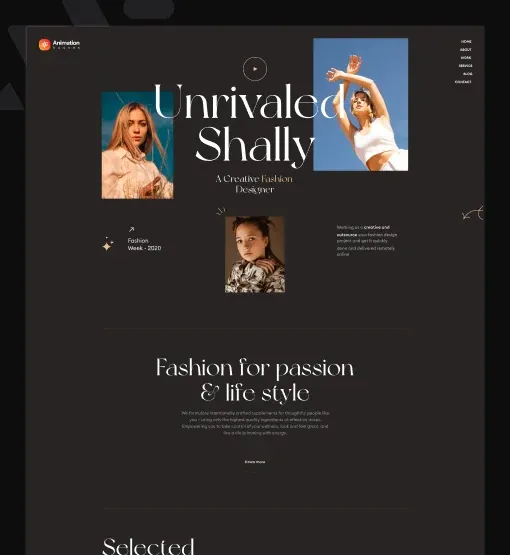
ShallyNew inLookbookJournal
A model in white linen looking out to sea
Home › Lookbook › Summer 2026 › Linen by the sea
Summer 2026 · Look 04

Linen by the sea

A cropped linen top and wide trousers in sea salt white. Made in Portugal.

Fashion lookbook

Elementor breadcrumbs for custom post types

A lookbook entry from a custom post type. The trail shows the lookbook archive and the season, aligned to the right in small uppercase text.

Click Lookbook, then Summer 2026

Set Separator Text to › and Alignment to Right. In the Style tab, set Typography to 12 px uppercase and the Text Color to a warm grey.

HaldenProjectsServicesAbout
A curved oak staircase in a bright hall

Staircases and joinery

Solid oak stairs, built in our workshop and fitted in two days. Each one is drawn for its room.

  • Oak, ash or walnut
  • Steel or timber balustrades
  • Fitted in two days
Service pages

Nested service pages and search

A service page three levels deep, with an arrow between levels. Search from the menu and the trail shows the results page.

Click Architecture, or search

Set HTML Tag to nav and Separator Text to →. In the Style tab, set the hover Color to orange.

Features

Key features of the Breadcrumbs Widget

What the widget does on each page and the settings you get in the panel.

A trail built for you

No list to maintain. The widget reads parent pages, parent categories, post type archives and taxonomy terms and builds the trail on each page.

Every page type

Posts, pages, category and tag archives, custom post types, date and author archives, search results and the 404 page each get their own trail. Elementor breadcrumbs for category pages need no extra setup.

Yoast SEO support

Turn on Enable Yoast for Elementor breadcrumbs with Yoast: the widget prints the Yoast trail. More options are in the Yoast Breadcrumbs panel.

Any separator

Set the Elementor breadcrumbs separator in Separator Text: a slash, a dash or an HTML entity like » or →.

Alignment per device

Set Alignment to left, center or right for desktop, tablet and mobile.

Your choice of tag

Pick the wrapper in HTML Tag: div by default, or p, nav or span.

Simple styling

Change breadcrumb color in Elementor with Text Color, Link Color and the hover Color, and set the Typography, all in the Style tab.

Internal links to parent pages

Each level except the current page is a real link, so visitors and search engines can move up your navigation hierarchy in one click.

Step by step

How to add breadcrumbs in Elementor

Five steps. The bold names are the labels in the Elementor panel.

  1. Install Animation Addons for Elementor from WordPress.org, then turn on Breadcrumbs in Animation Addons → Elements.

  2. Open a page, or a single post or archive template, and drag the Breadcrumbs widget under the title.

  3. Leave Enable Yoast off for the built-in trail, or turn it on if Yoast SEO is active.

  4. Set the Alignment, the HTML Tag and the Separator Text.

  5. In the Style tab, set Typography, Text Color and Link Color, then check a post, a page and an archive.

Try it free Free on WordPress.org · Works with Elementor Free
FAQ

Questions about the Breadcrumbs Widget

How do I add breadcrumbs in Elementor?

Install Animation Addons for Elementor, drag the Breadcrumbs widget onto a page or template and publish. The trail fills in on its own for each page.

Can I get free Elementor breadcrumbs?

Yes. The Breadcrumbs Widget is part of the free Animation Addons for Elementor plugin on WordPress.org. It works as an Elementor breadcrumbs plugin with Elementor Free.

Do I need Yoast SEO for breadcrumbs?

No. You get Elementor breadcrumbs without Yoast, because the widget has its own trail. Yoast is only needed if you turn on Enable Yoast to print Yoast breadcrumbs instead.

Which pages show a breadcrumb trail?

Posts, pages with parent pages, category and tag archives, custom post types and their terms, date and author archives, search results and 404 pages.

Can I change the breadcrumb separator?

Yes. Type any text or HTML entity in Separator Text, such as / or ». With Enable Yoast on, the separator comes from Yoast.

Does the widget add BreadcrumbList schema?

No. The built-in trail is plain HTML links with no schema markup. Breadcrumb structured data has to come from your SEO plugin.

Can I put breadcrumbs in a single post template?

Yes. Add the widget to your single post template to get Elementor breadcrumbs for single posts. It shows the right trail for each post that uses the template. Page and archive templates work the same way.

Why do my breadcrumbs only show Home?

On the front page the trail is only Home, because there is no level above it. On posts, pages and archives the widget adds the parent levels and the current page.

Does it work in Elementor 4?

Yes. It is a classic widget, so Elementor 4 lists it with the legacy widgets and it works on the same page as atomic elements.

Animation Addons Pro · Elementor 4

Show the way on every page

A free breadcrumb trail for posts, pages and archives, styled in Elementor.

  • 15-day money-back guarantee
  • Rated 4.6 / 5 on WordPress.org
  • No Elementor Pro needed
  • Elementor 3 & 4 in one license