


V4 Early Bird: up to 25% off Annual, up to 30% off Lifetime, and 2x site activations on every plan. Ends Oct 17.V4 Early Bird: up to 30% off + 2x sites · ends Oct 17. See plans →
Classic Elementor widget · Pro

Animated Off-Canvas for Elementor: A hidden menu panel that slides in, with your logo and contact details

Put a small menu button in your header and keep the full navigation one click away. The Animated Off-Canvas widget is an Elementor off canvas menu widget: an Elementor hamburger menu that opens a full screen menu, with your WordPress menu on one side and logo, contact details, social links and search on the other. It is an Elementor animated menu, because the two columns slide in from opposite edges.

  • Full-screen slide-in panel
  • WordPress menu with sub-menus
  • Contact, social and search
  • Two-column layout

Classic widget · Elementor 3 and 4 · ProUpdated

Live demos

Three off-canvas menus, live

Three headers, each with an off canvas menu for Elementor: a design studio, a film studio and an interior studio. Press the menu button to open the panel. On this page each panel opens inside its frame instead of over the whole screen. The close button or Escape shuts it.

Arolax

Award-winning design studio, based in NYC

Brand and motion studio

We build brands that move people.

Identity, motion and websites for teams who want to be remembered.

The Arolax team planning a brand project around a table
Agency menu

Studio menu with a contact column

A dark header for a design studio, with a hamburger button on the right. The panel shows the logo, email, phone, address, search and social icons on the left, and the site menu in large type on the right. Services and Journal open to their sub pages.

Open the menu, then Services

Keep both columns on. In Off-Canvas Left, set Width to 40% and add the logo, Contact Information, Search and Follow Information. Choose the site menu in Menu, and color the links in Menu Settings.

Sahara Films

Independent films, made in the desert

A still from a Sahara Films production
Now showing

The Long Dune

A road movie across 900 km of sand. In cinemas from 12 November.

Full-screen menu

Film studio menu, nothing else

The header of a small film studio. The left column is hidden, so the menu fills the whole panel and reads like a full-screen mobile menu. Festival and About open to their sub pages.

Open the menu, then close it

In Off-Canvas Left, set Display to Hide. The menu then fills the panel. Set the background in Off-Canvas Right, and style the plus and minus in Expand Icon (for Submenus).

Maison Forme

Interior design studio · Copenhagen

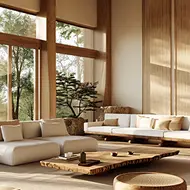
A calm living room with a low linen sofa
Autumn projects

Calm rooms, built to last

Homes in oak, linen and stone, designed with the people who live in them.

Light menu with a label

Interior studio menu with a Menu label

A white header with a Menu label instead of a hamburger. The panel is light, with the menu on the left and the studio address and search on the right. Language links sit above the close button.

Press Menu, then pick a language

Type Menu in Open Button Text. In Off-Canvas Settings, turn on Swap Column to put the menu on the left, then add the Language Tab links and a light Background Type.

Features

Key features of Animated Off-Canvas

What the widget gives you. Each feature is a real setting in the Elementor panel.

Slide in animation

The panel fades in over half a second while the left column drops from the top and the right column rises from below. It is an Elementor slide in menu, and closing plays the motion in reverse.

Customizable open button

Show a label such as "Menu" with Open Button Text, an icon with Enable Icon Toggle Button, or both. This is your Elementor header menu button. Set its color and typography in Open Button.

Menu with sub menus

Pick any WordPress menu in Menu. It becomes an Elementor off canvas menu with sub menus: items with children open under a plus icon, styled in Expand Icon (for Submenus).

Logo and image support

Add your logo or an image with Add Logo or Image and set its Width & Height in Logo/Image.

Contact details

List email, phone and address with Contact Information Tab, with its own label color, typography and gap in Contact.

Social links and search

Add icons in Follow Information Tab with a hover color. With the logo, this gives you an Elementor menu with logo and social icons, and a search bar sits under it.

Language links

Add language links with the Language Tab. They show next to the close button.

Layout and close button

Show, hide, size and color each column in Off-Canvas Left and Off-Canvas Right, and flip them with Swap Column. Hide the left column and you have an Elementor full screen menu. Set the Close Button icon size, circle size and background.

Step by step

How to create an off canvas menu in Elementor

Five steps. The bold names are the labels in the Elementor panel.

  1. Install Animation Addons Pro, then turn on Animated Off-Canvas in Animation Addons → Elements.

  2. Open your header or page in Elementor, search the panel for Animated Off-Canvas and drag it where the menu button should sit.

  3. In Settings, write the Open Button Text or turn on Enable Icon Toggle Button and choose the icons.

  4. In Content, choose the Menu and add the logo, Contact Information Tab, Language Tab and Follow Information Tab.

  5. Style Off-Canvas Left, Off-Canvas Right, Menu Settings and Close Button in the Style tab, then preview on desktop and mobile.

Get Animation Addons Pro Part of Animation Addons Pro · Works with Elementor Free
FAQ

Questions about Animated Off-Canvas

How do I add an off canvas menu in Elementor?

Add the Animated Off-Canvas widget to your header, choose a WordPress menu in Menu and set the open button. Visitors click the button and the panel slides in over the page.

How do I make an Elementor hamburger menu?

Turn on Enable Icon Toggle Button in Settings. The widget shows a hamburger icon that opens the menu panel, and you can add a text label with Open Button Text.

Do I need Elementor Pro for an off canvas menu?

No. You can build an Elementor off canvas menu without Elementor Pro. Animated Off-Canvas works with Elementor Free. It is part of Animation Addons Pro, not Elementor Pro.

Can I use it as a mobile menu drawer?

Yes. Put the widget in your header and hide the left column with Off-Canvas Left, Display. The menu then fills the screen as an Elementor mobile menu drawer.

Can I make an Elementor full screen menu?

Yes. The panel covers the whole screen. Show both columns for a menu with contact details, or hide the left column for a menu only layout.

How does the panel slide in?

The panel fades in over half a second. At the same time the left column moves down from the top and the right column moves up from the bottom, both fading in. Closing reverses it.

Can the menu show sub-menus?

Yes. Menu items with children get a plus icon. A click slides the sub-menu open and turns the icon into a minus.

What else can go in the off-canvas panel?

A logo or image, contact details, social icons, a search bar and language links. Each part can be shown or hidden and styled on its own.

How do visitors close the off-canvas panel?

With the round close button at the top of the menu column. You set its icon size, circle size, border radius, color and background.

Does it work in Elementor 4?

Yes. It is a classic widget, so Elementor 4 lists it with the legacy widgets. In the Atomic Editor you can also use the Offcanvas atomic element.

Animation Addons Pro · Elementor 4

Hide the menu, keep it close

A full-screen off-canvas menu with smooth motion, built in Elementor.

V4 Early BirdUp to 30% off and 2x sitesEnds Oct 17

  • 15-day money-back guarantee
  • Rated 4.6 / 5 on WordPress.org
  • No Elementor Pro needed
  • Elementor 3 & 4 in one license


