


 Login
Login


You are excited to launch your website, but are stuck between using a template or starting from scratch. It’s a familiar dilemma for many creators, business owners, and freelancers.
On one hand, building from scratch feels original and professional. On the other hand, templates promise speed, simplicity, and lower costs. But then the doubts kick in —
“Aren’t templates too generic?”
“Won’t my website look like everyone else’s?”
“Can I really customize it the way I want?”
Many people still believe templates are limited, but that’s no longer true. Modern website templates are flexible, responsive, SEO-friendly, and fully customizable with no coding needed. Whether it’s a portfolio, store, or agency site, templates help you bring ideas to life faster.
In this blog, we’ll uncover the real benefits of using templates to design your website, how they help you build faster, save money, and still look polished and professional. By the end, you’ll see why templates aren’t just a shortcut; they’re a smart way to create a website that truly works for you.
What Are Website Templates?
A website template is a ready-made layout that provides your site with a structure, design, and style all in one. Instead of building a website from scratch, you can customize the template with your text, images, and colors to match your brand.
For WordPress users, templates come as themes or page builder layouts that are flexible, responsive, and often SEO-friendly. You don’t need coding skills; everything is drag-and-drop.
For example, John, a marketer, needed a professional website fast. He picked a WordPress template, customized the content, and added animations easily using a no-code approach. In hours, his site looked polished and engaging without writing a single line of code.
Modern templates let you build faster, save money, and still create professional-looking websites, making them a smart choice for businesses, freelancers, and creators alike.
The Growing Popularity of Website Templates
Website templates have become a go-to solution for businesses, freelancers, and agencies. Increasingly, people are turning to prebuilt templates because they make website creation faster, easier, and more cost-effective.
Freelancers
Freelancers often need to build client websites quickly and professionally. Using WordPress templates or prebuilt designs allows them to save time, reduce costs, and deliver polished animated websites without writing code.
Agencies
Creative agencies often handle many clients and tight project deadlines. Website templates provide a reliable foundation that they can customize and scale efficiently. Modern WordPress templates are flexible, responsive, and SEO-friendly, making them ideal for client projects.
Small Businesses
Small business owners often don’t have coding experience. Prebuilt website templates help them launch professional-looking sites quickly, while saving on hiring costs. They can create no-code websites that are functional, visually appealing, and ready to engage customers.
Non-Tech Founders
Even without technical skills, founders can use website templates to create a professional online presence. Drag-and-drop layouts let them focus on content and branding rather than complex coding.
Clearly, website templates are no longer just a shortcut; they’re a smart, strategic choice for anyone building a website today. So, what exactly makes templates such a smart choice? Let’s break it down.
Types of Website Templates
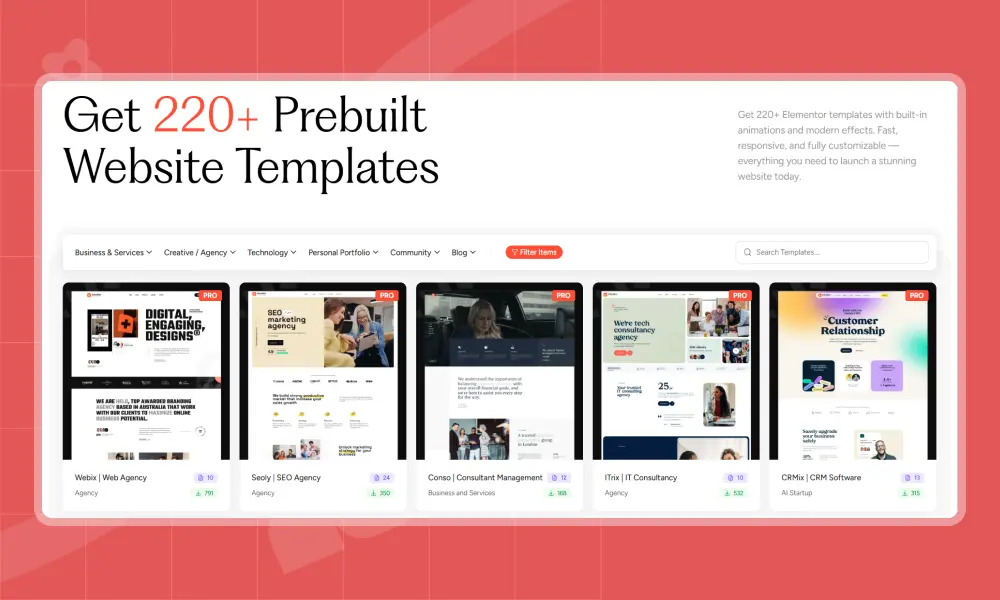
Website templates come in all shapes and styles, designed for almost every industry and purpose. Here are some of the most popular types:
Business Templates: Great for startups and service-based brands, featuring sections for services, teams, and contact forms.
Portfolio Templates: Ideal for designers and photographers to showcase work with galleries and visual layouts.
Blog Templates: Built for writers and educators, focusing on clean design and SEO-friendly readability.
eCommerce Templates: Ready-made for online stores with product listings, carts, and checkout pages.
One-Page Templates: Perfect for landing pages or single-product websites with smooth scrolling layouts.
Beauty & Wellness Templates: Designed for salons, spas, and fitness businesses with booking and service sections.
Restaurant & Food Templates: Include menus, reservation forms, and gallery spaces to display flip dishes animation beautifully.
Industrial & Service Templates: Made for construction, plumbing, and similar businesses with a clear, professional look.
All modern WordPress templates are fully responsive and customizable, so your website looks great on any device
Website Templates vs. Custom Design: A Quick Comparison
| Feature | Website Templates | Custom Web Design |
| Cost | Affordable – Ideal for startups and small businesses looking for budget-friendly website solutions. | Expensive – Higher upfront cost due to design, development, and customization. |
| Time to Launch | Fast setup – Get your site live within hours or days using prebuilt layouts. | Takes weeks/months – Requires design, coding, and multiple development stages. |
| Flexibility | Moderate–High Customizable with drag-and-drop tools and theme options. | Unlimited – Fully tailored design and features built from scratch. |
| Maintenance | Easy & Low-cost – Simple to update without technical help; regular template updates included. | Developer-dependent Ongoing maintenance and updates require coding support. |
| SEO & Performance | Optimized out-of-the-box Mobile-responsive and SEO-ready templates. | Custom-optimized Advanced SEO, speed, and UX built specifically for your goals. |
| Best For | Startups, freelancers, and small agencies need quick, affordable sites. | Enterprises and established brands seeking a unique, fully customized website. |
Key Benefits of Using Templates to Design a Website
Modern WordPress templates give you a professional starting point that’s flexible, SEO-ready, and easy to customize even if you’re not a developer. Here’s are the benefits of templates to help you build better, faster, and more affordably.
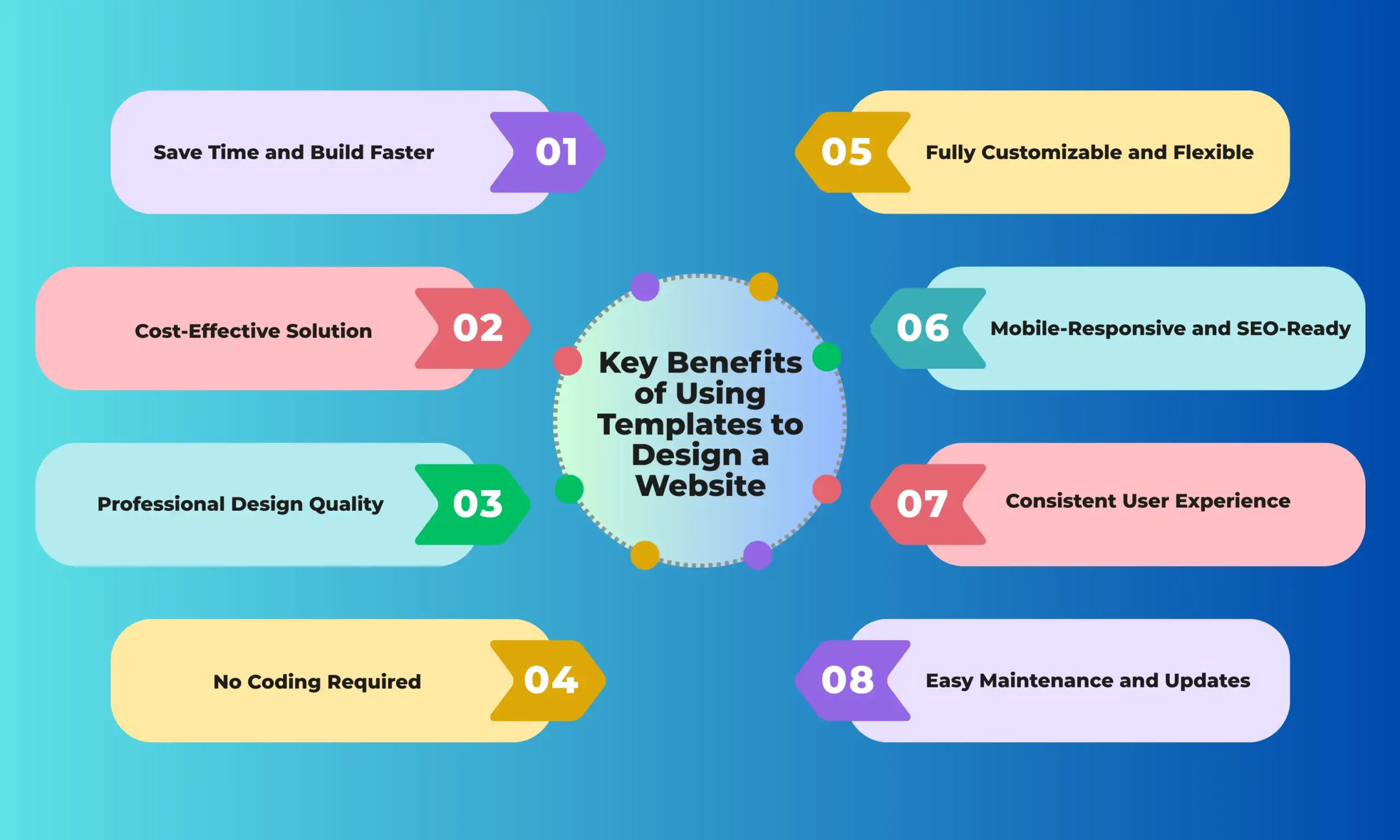
1. Save Time and Build Faster
Building from scratch takes weeks of planning, design, and development. With prebuilt website templates, much of that groundwork is already done. All you have to do is add your content, tweak the layout, and you’re ready to launch.
2. Cost-Effective Solution
A custom website can cost anywhere from $2,000 to $10,000, depending on complexity. In contrast, premium templates often cost under $100 and come with ready-made layouts, sections, and design assets.
3. Professional Design Quality
Modern templates are designed by professionals who understand layout balance, typography, and UX. You get polished, conversion-ready designs that look as if they were built by an agency right out of the box.
4. No Coding Required
Templates make no-code web design possible. Using drag-and-drop page builders like Elementor or Gutenberg, you can edit text, images, and sections without touching a single line of code.
5. Fully Customizable and Flexible
One of the biggest myths about templates is that they all look the same. The truth? Templates today are endlessly flexible. You can change color palettes, adjust layouts, add animations, and integrate your own brand elements with ease.
6. Mobile-Responsive and SEO Optimized
Most modern website templates and themes are responsive by default, meaning they look great on desktops, tablets, and smartphones. They’re also optimized with clean code and fast loading times, improving SEO and user experience.
7. Consistent User Experience
Templates maintain consistent design elements across every page — fonts, colors, and spacing all align perfectly. That visual consistency builds trust and makes the browsing experience smoother for visitors.
8. Easy Maintenance and Updates
Updating a template-based website is straightforward. You can swap images, edit copy, or refresh the layout without redesigning everything from scratch.
9. Bonus: Add Life and Motion
Templates give you structure, and animations give you soul. By adding subtle motion effects, scroll animations, and interactive transitions, you can transform a static template into a dynamic, story-driven experience that holds attention.
How to Choose the Right Website Template
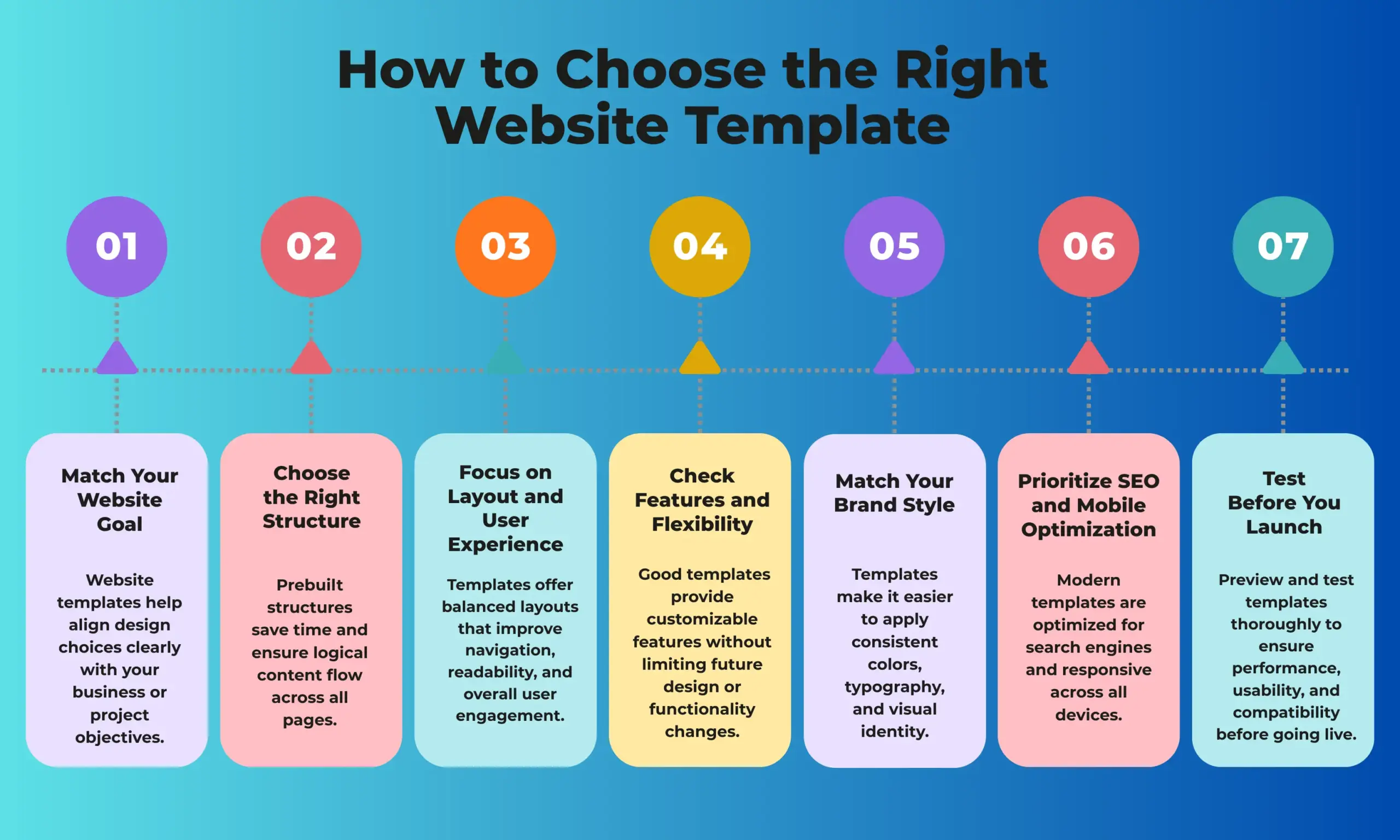
Match Your Website Goal
- Pick a template that fits your site type: portfolio, business, blog, or online store. It should support your main purpose and make visitor actions easy.
Choose the Right Structure
Look for templates designed for your niche, eCommerce, agency, or personal branding. The right structure saves time and makes navigation simple.
Focus on Layout and User Experience
Select a clean, responsive, and user-friendly layout. A clutter-free design keeps visitors engaged and boosts conversions.
Check Features and Flexibility
Ensure the template supports what you need like product galleries, contact forms, booking options, or blog sections. Templates that allow Lottie animations or motion effects can make your site more engaging.
Match Your Brand Style
- Choose a template that complements your brand’s look and feel — minimal, bold, or creative. You can customize colors, fonts, and images, but start with a style that fits your identity.
Prioritize SEO and Mobile Optimization
Pick an SEO-friendly, mobile-responsive template with fast-loading pages and clean code to improve search rankings and user experience.
Test Before You Launch
Preview your template with actual content before going live.
Enhancing Templates with No-Code Animation Tools
Templates provide your website with a solid foundation, but what truly makes it stand out is the experience it offers when someone interacts with it. Subtle motion, smooth transitions, and well-placed animations can turn a simple layout into a rich, dynamic experience that keeps visitors engaged from the first scroll.
That’s the difference between a static site and one that feels alive: movement adds energy, guides attention, and helps tell your story visually.
Why Add Animations to Your Template?
Animations aren’t just about making things “look cool.” When used thoughtfully, they make your website more intuitive and enjoyable to explore.
Here’s how animations can make a real difference on your site:
- Guide focus: Direct users’ eyes toward important content or interactive button animations.
- Enhance storytelling: Reveal elements step by step as visitors scroll.
- Smooth the journey: Subtle motion helps users navigate with ease.
- Add personality: Small effects make your design feel more polished and professional.
When every animation has a purpose, your site feels cleaner, faster, and more engaging — not overwhelming.
The Power of No-Code Animation Tools
Not long ago, adding motion to a website meant hiring a developer or writing complex code. Today, Animation Addons has completely changed the game. With a simple drag-and-drop interface, it allows you to bring professional motion design to any template without touching a single line of code.
Animation Addons helps you transform static templates into engaging, interactive websites that capture attention, guide visitors, and elevate your brand. You can animate text, buttons, images, and entire sections in just a few clicks, using scroll-triggered reveals, hover effects, and entrance animations to make content appear naturally as users explore your site. Full control over timing, direction, and triggers allows you to craft smooth, purposeful motion that fits your brand’s style and storytelling.
Animation Addons is more than just an animation plugin; it’s a complete toolkit for building interactive, engaging, and modern websites. Here’s what makes it stand out:
- 200+ Prebuilt Websites Templates: Import ready-to-use sites and go live instantly. Perfect for speeding up website creation.
- 2,000+ Animated Pages & 10,000+ Animated Sections: Build fully dynamic designs with ready-made content blocks and layouts.
- Purpose-Built for Animations: Designed specifically to enhance interactivity and user engagement.
- Advanced Animation Effects: Includes scroll animations, hover effects, text animations, and other motion-driven elements.
- GSAP Integration: Create professional-grade, high-performance animations without coding.
- Seamless Elementor Integration: Works flawlessly with both Elementor Free and Pro for drag-and-drop animation control.
- Boosts UX & Conversions: Engaging motion guides visitors through your content, reduces bounce rates, and encourages action.
- Easy for Everyone: Perfect for freelancers, agencies, designers, marketers, and business owners, no coding required.
- Modern, Interactive Websites: Helps create sites that look polished, feel dynamic, and keep users scrolling and interacting.
One of the best things about modern website templates is that they’re tailored for different industries, businesses, and creative needs, and Animation Addons enhances every one of them. Whether it’s a portfolio, an online store, a restaurant site, or an agency page, you can add scroll-triggered effects, hover animations, entrance transitions, and custom motion to any section, bringing your template to life and making your website truly interactive and unique.
Wrap Up
Website templates give you a strong foundation, save time, reduce costs, and provide professional designs ready for any industry or business type. When you combine these templates with Animation Addons, you can fully customize every section, add creative animations, and turn a static layout into a dynamic, interactive experience. Scroll effects, hover animations, and entrance transitions let you guide visitors, tell your story, and make your site feel truly unique.
The combination of prebuilt templates and no-code animations means you don’t need to be a developer to create a website that looks polished, engages visitors, and drives results. It gives you the freedom to add creativity, personality, and full customization, making your site not just functional but memorable. Whether you’re a freelancer, agency, or business owner, this approach helps you build a modern, interactive website that’s fast, easy, and uniquely yours.



Leave a Reply