Explore the features that transform smooth scrolling and stunning animations into reality, enhancing your Elementor designs.
What is Custom Icons extension?
The Custom Icons extension allows you to upload and use your own icons on your website instead of default icon libraries. It helps you maintain brand consistency and create unique, visually appealing designs with fully personalized icon sets.
What makes this extension essential?
This extension gives you full control over icon design and branding. It helps create a unique visual identity while improving design flexibility and overall website appearance.
Key features of Custom Icons extension
Easily upload custom SVG or icon files to use across your website.
Use uploaded icons directly within widgets and elements without extra configuration steps.
Maintain consistent design by using unique icons that match your brand style.
How It Works
Explore the below documentation to get a clear idea of how to use the WCF Animation.
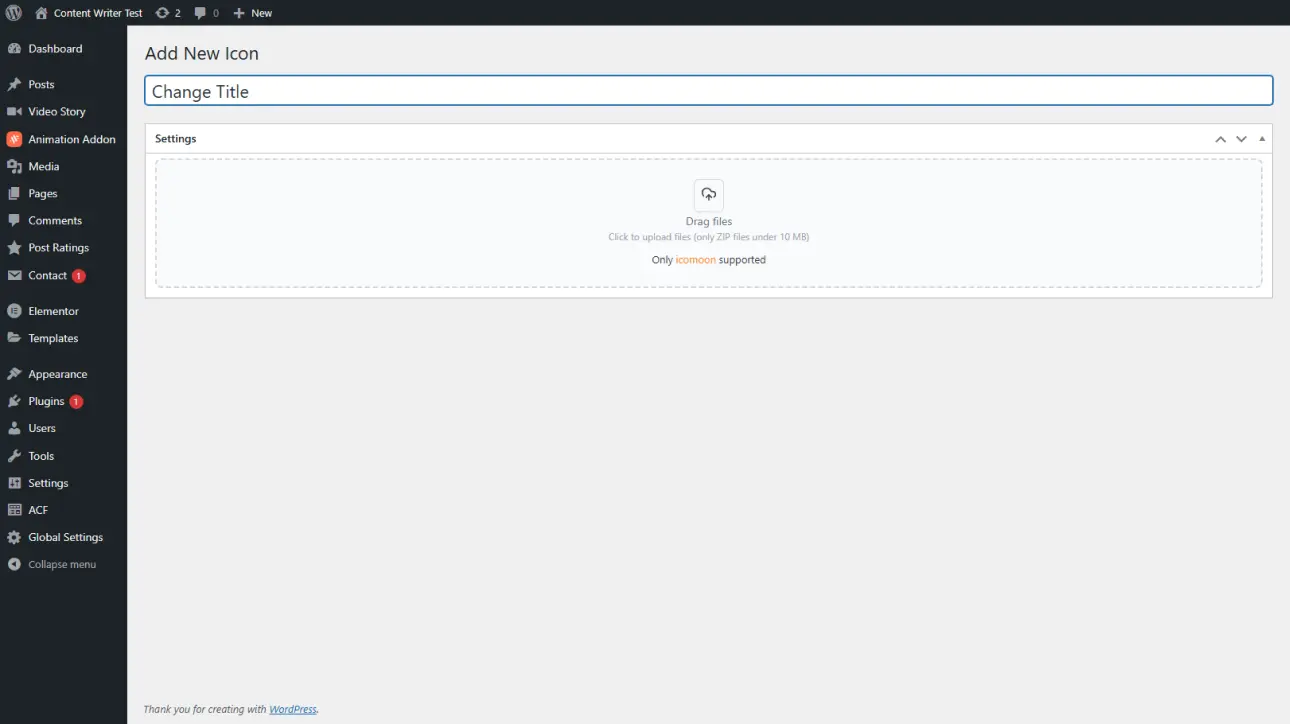
Go to the Custom Icons section in Animation Addons and upload your icon files, typically in SVG format. This allows you to store and manage all your custom icons in one place easily.
Step 2: Access Icons in Editor
Once uploaded, your custom icons become available inside the editor. You can select them just like default icons while designing pages, ensuring quick and smooth integration into your layouts.
Step 3: Apply Icons to Elements
Choose your custom icons for buttons, lists, or widgets and apply them instantly. This helps you enhance visuals, maintain branding, and create a more personalized and professional website design.
25% Off
Limited Time Offer
Get 25% off any lifetime license, plus 2x the sites on every tier. Pay
once. Keep it for life.



 Login
Login