Explore the features that transform smooth scrolling and stunning animations into reality, enhancing your Elementor designs.
What is Custom Fonts extension?
The Custom Fonts extension allows you to upload and integrate your own font files into your website, giving you full control over typography and enabling consistent branding beyond default font libraries.
What makes this extension essential?
It helps maintain brand consistency by enabling unique typography choices, ensuring your website stands out while delivering a professional and visually cohesive design experience.
Key features of Custom Fonts extension
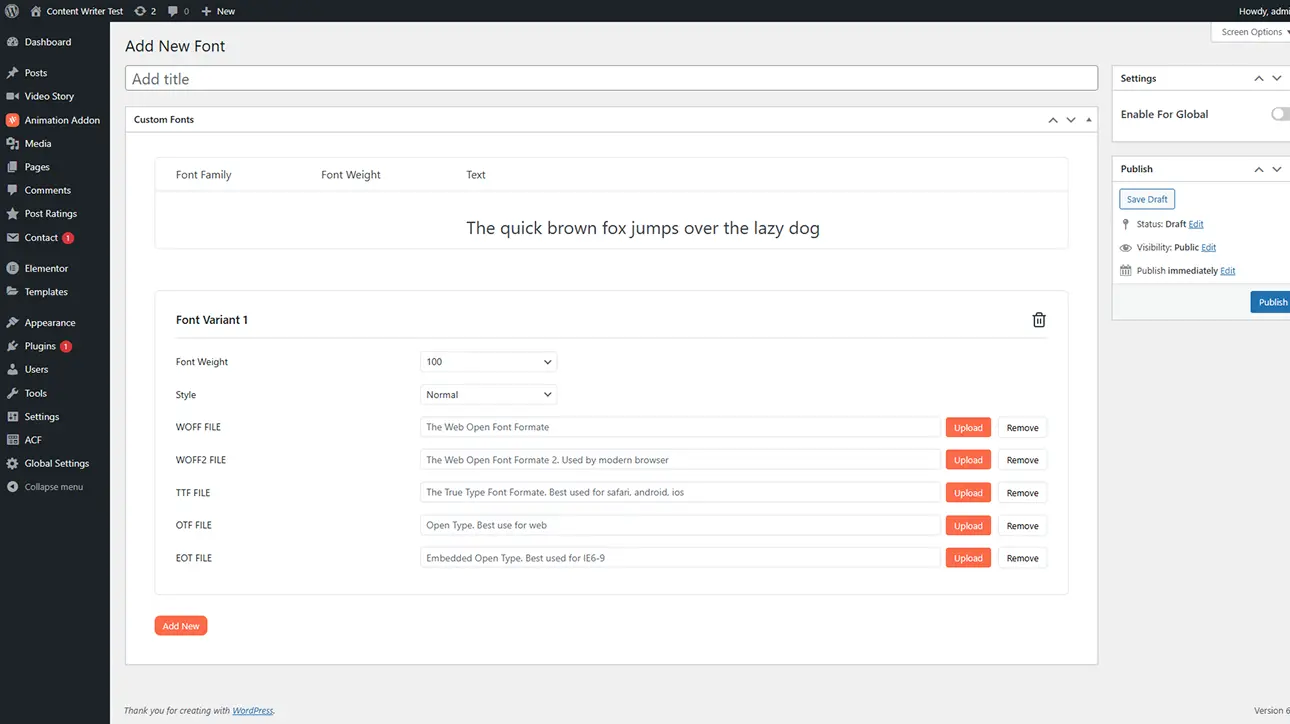
Easily upload and use custom font files to match your brand identity.
Support various formats like WOFF, TTF, and OTF for better compatibility.
Use custom fonts globally or on specific elements for consistent design control.
How It Works
Explore the below documentation to get a clear idea of how to use the WCF Animation.
Access the Custom Fonts extension and upload your desired font files in supported formats. Organize font weights and styles to ensure proper usage across different design elements.
Step 2: Assign Fonts to Elements
Select your uploaded fonts within the editor and apply them to headings, paragraphs, or specific sections, allowing you to seamlessly integrate custom typography into your design.
Step 3: Customize and Publish
Adjust font size, weight, spacing, and responsiveness to match your design goals. Once finalized, publish your website with consistent, branded typography applied throughout.
25% Off
Limited Time Offer
Get 25% off any lifetime license, plus 2x the sites on every tier. Pay
once. Keep it for life.



 Login
Login