Explore the features that transform smooth scrolling and stunning animations into reality, enhancing your Elementor designs.
What is Post Type Builder extension?
The Post Type Builder extension creates and manages custom post types for structured content like portfolios, services, case studies, making it easier to organize and display dynamic content on website.
What makes this extension essential?
This extension helps you organize different types of content efficiently, create structured layouts, and manage dynamic website sections. It makes your site more scalable and easier to maintain.
Key features of Post Type Builder extension
Easily create custom post types for portfolios, services or testimonials.
Organize and manage different content types separately to maintain and scale your website.
Display custom post types dynamically across pages using widgets, templates, or layouts.
How It Works
Explore the below documentation to get a clear idea of how to use the animation.
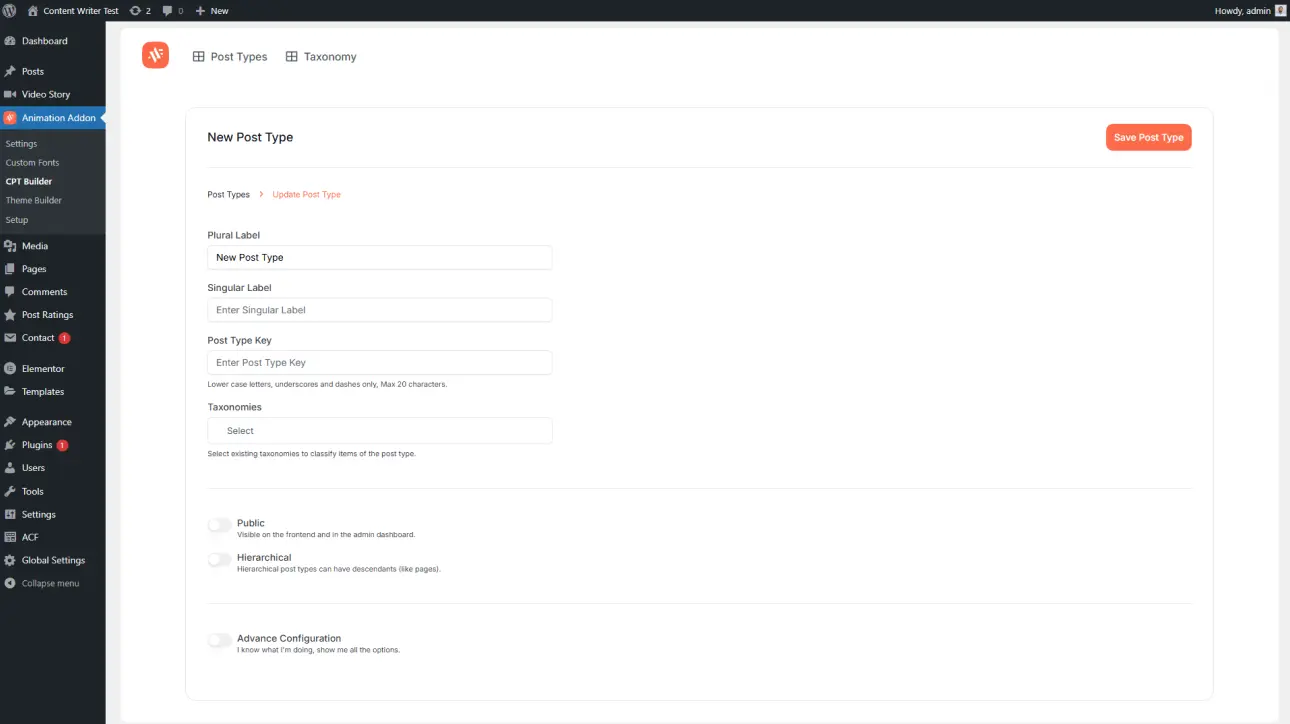
Open the Post Type Builder from the Animation Addons dashboard and create a new post type. Give it a name such as Portfolio, Services, or Testimonials to organize similar content in a structured way.
Step 2: Add Fields and Configure Settings
Configure the post type by adding necessary fields like title, image, description, or custom data. Adjust labels and settings to match your content structure and make content management simple and organized.
Step 3: Add and Display Your Content
Start adding content to your new post type just like regular posts. Then display the content on your website using compatible widgets, templates, or layouts provided by Animation Addons
Ready to take your designs further? Animation Addons gives you everything you need to design websites that stand out with clean, professional animations.



 Login
Login